EasyManua.ls Logo

Lasonic i-931X - Setup Menu Operation; Accessing and Configuring Settings

Lasonic i-931X
28 pages
Print Icon
To Next Page IconTo Next Page
To Previous Page IconTo Previous Page
Loading...
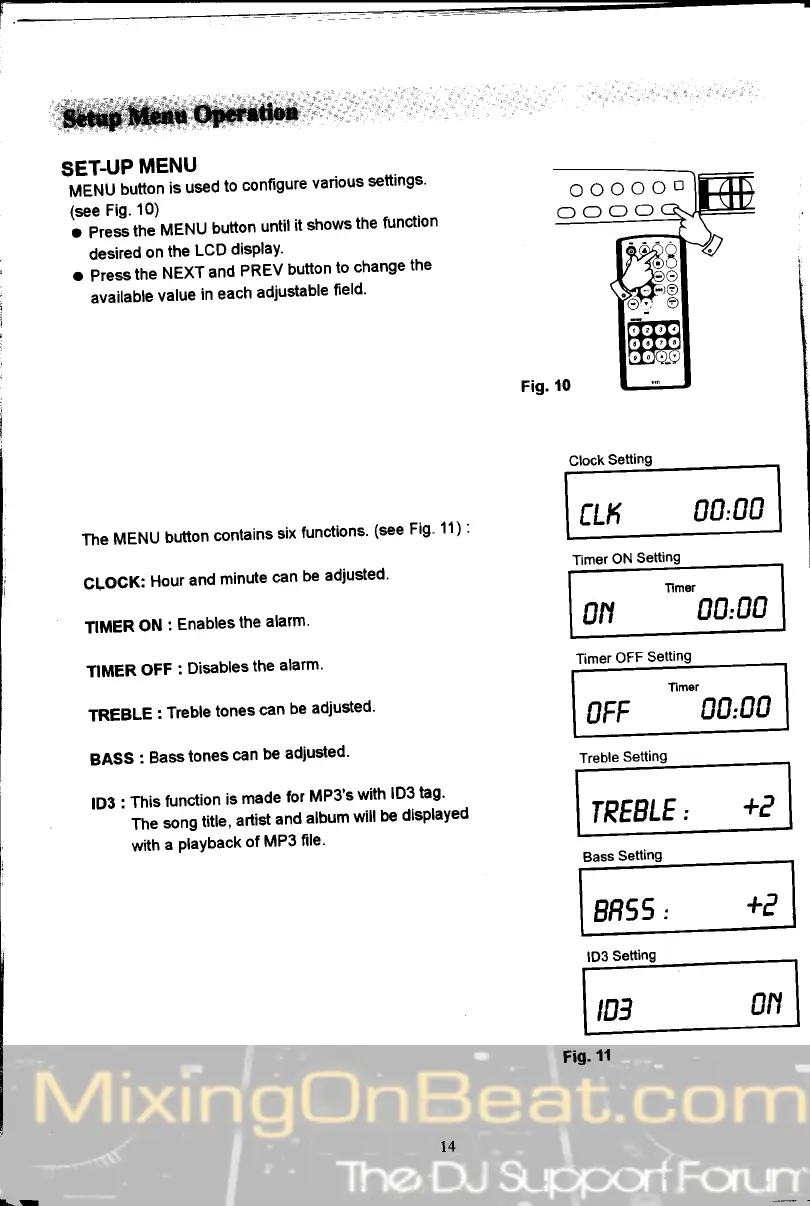
SET.UP
MENU
frtEruU
button
is
used
to
configure
various
settings'
(see
Fig.
10)
o
Pres-s
the
MENU
button
until
it
shows
the
function
desired
on
the
LCD
disPlaY'
o
Press
the
NEXT
and
PREV
button
to
change
the
available
value
in
each
adjustable
fleld'
The
MENU
button
contains
six
functions'
(see
Fig'
11)
:
CLOCK:
Hour
and
minute
can
be
adiusted'
TIMER
ON
:
Enables
the
alarm'
TIMER
OFF
:
Disables
the
alarm'
TREBLE
:
Treble
tones
can
be
adjusted'
BASS
: Basstones
can
be
adjusted'
lD3
:
This
function
is
made
for
MP3's
with
lD3
tag'
The
song
title,
artist
and
album
will
be
displayeo
with
a
PlaYback
of
MP3
file'
Clock
Setting
CLK
OO,OO
Timer
ON
Setting
TImor
0N
00'00
8H55,
*P
Bass
Setting
lD3
Setting
Fig.
tl
oooooD
NN
U"
,03