This unit
is equipped with an
iPhone Dock.
o
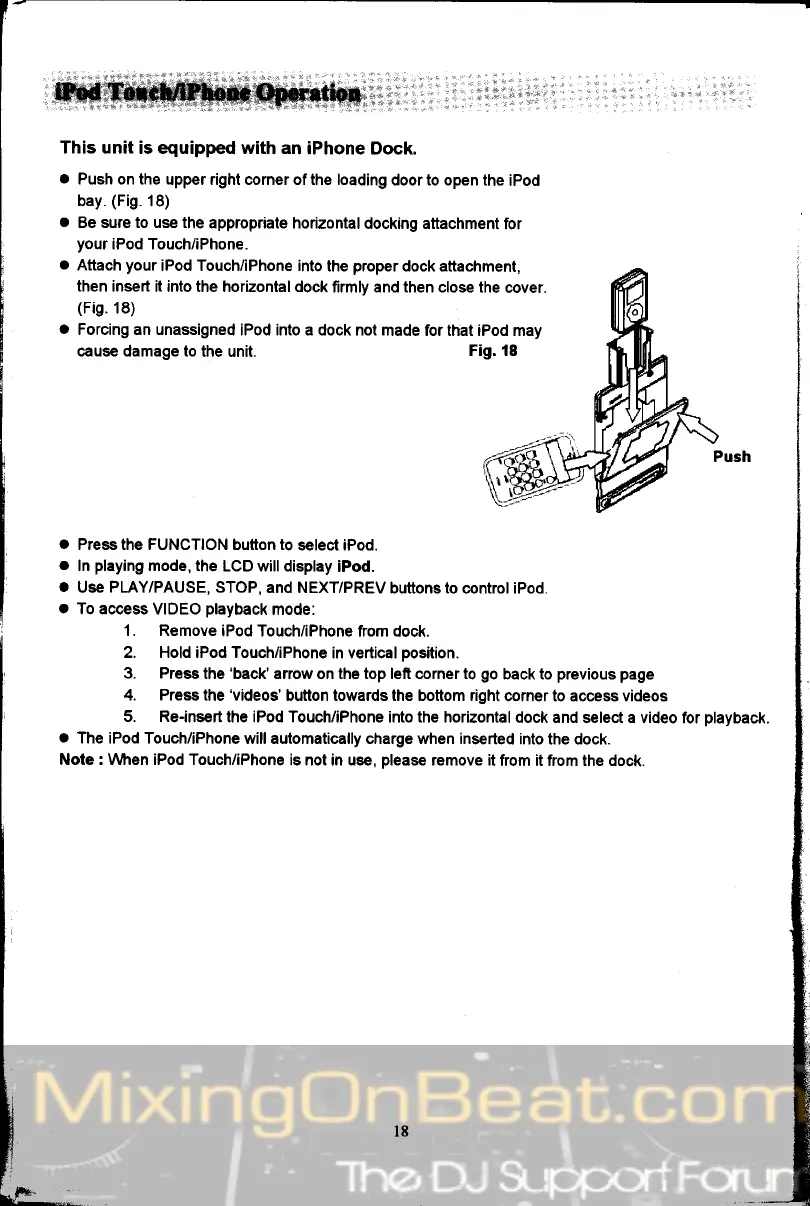
Push on the
upper right corner of the loading
door to open the
iPod
bay.
(Fig.
18)
.
Be sure to use the
appropriate horizontal
docking attachment
for
your
iPod Touch/iPhone.
.
Attach
your
iPod Touch/iPhone into
lhe
proper
dock attachment,
then insert
it into the horizontal dock
firmly and then close the
cover.
(Fig.18)
a
Forcing an unassigned
iPod into a dock not
made for that iPod may
cause damage to
the unit.
Fig. 18
o
Press the FUNCTION button to
select iPod.
o
In
playing
mode,
the LCD will display
iPod.
o
Use PLAY/PAUSE, STOP,
and NEXT/PREV
buttons to conkol iPod.
o
To access VIDEO
playback
mode:
1. Remove
iPod Touch/iPhone from
dock.
2. Hold iPod Touch/iPhone
in vertical
position.
3. Press
the
'back'arrow
on the top left corner to
go
back to
previous page
4. Press
the
'videos'
button towards the bottom right
corner to access videos
5. Re-insert
the iPod Touch/iPhone into the horizontal
dock and select a video
for
playback.
o
The iPod Touch/iPhone
will automatically charge when inserted
into the dock.
Note : \Mren iPod Touch/iPhone
is not in use,
please
remove it
from it from the dock.
"aai
ir


 To Next Page