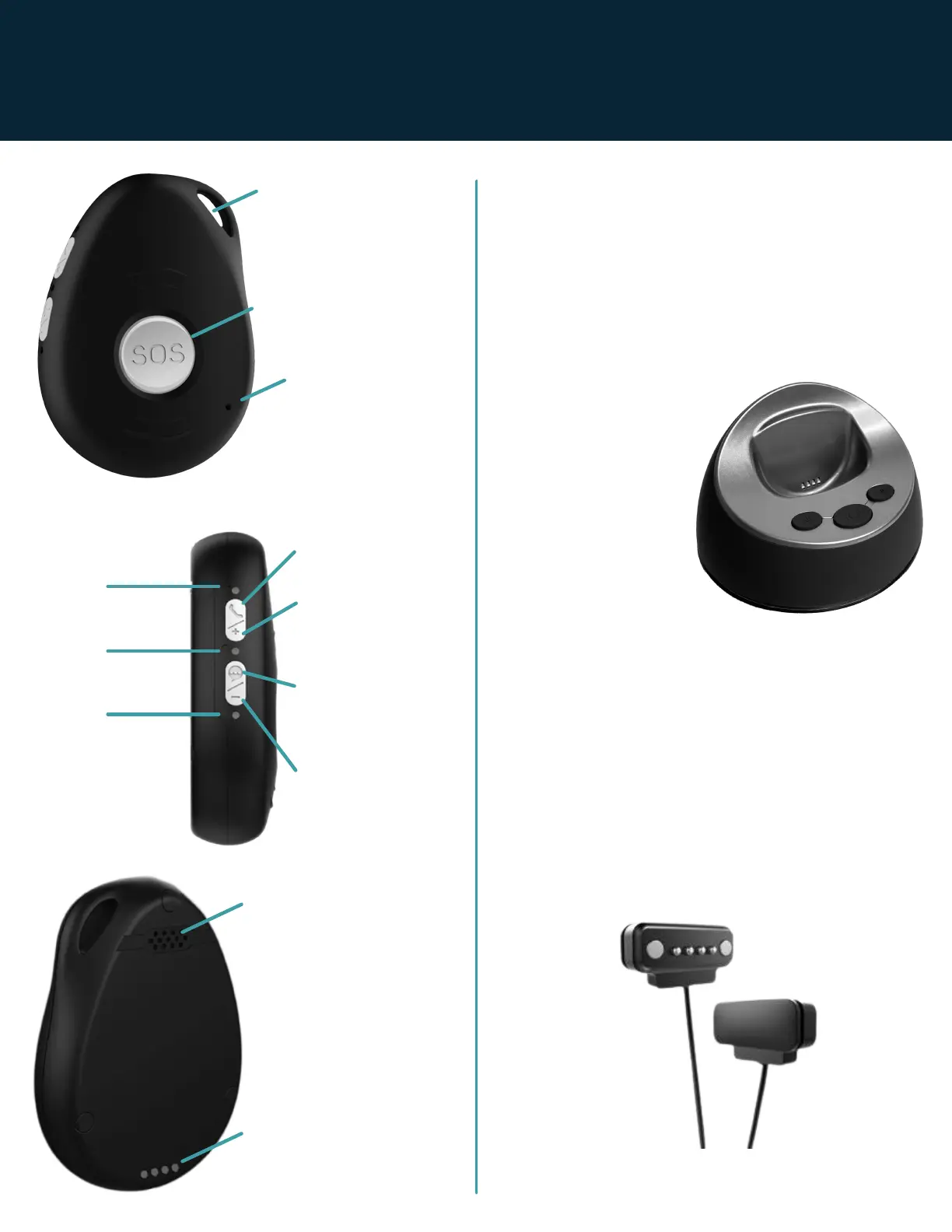
Side of Device
GREEN
Mobile Indicator
BLUE
Location Indicator
PINK
Battery Indicator
+Volume Up
Side Talk Button
Voice
Announcement
On/Off
-Volume Down
Press during a call to
decrease the volume
Press during a call to
increase the volume
Front of Device
SOS/Help Button
Microphone
Lanyard Hole
Speaker
Back of Device
Charging Contacts
BASIC OPERATION
OVERVIEW OF CHARGER
Placing the device in the charging station
Please make sure you place the device in
the correct position. It is in the correct
position when it vibrates and when the red
LED glows brightly. If the device is off it will
turn on when you place it in the charger.
Dry device
completely before
each charge. Wipe
all water, sweat,
perfumes, and
fragrant oils from
device before
placing in charging
station.
OPTIONAL CHARGING VIA THE
MAGNETIC USB CHARGING
CABLE
You can charge the device by attaching the
magnetic USB cable plug to the four
charging contacts on the rear of the
pendant and the other end into the adapter.
Use this charging method when way from
home.
Page 3 | Latitude USA | 2021



 To Next Page