BASIC OPERATION
GETTING A GPS CONNECTION
Taking your device outside
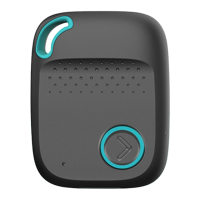
When you take the mobile device out of the
box you will need to turn it on. Take the
pendant outside for ten minutes. This is so
the device can make its connection to the
satellites and get an accurate location.
When it is not connected to the 4GPlus 4G,
or 3G network and trying to connect it will
show a 'slow' (1 second in length) flash every
3 seconds.
This feature is optional and can be activated
or deactivated by purchasers' request.
OUTGOING CALL TO CONTACT 1
Side talk feature
The device has a ‘Side talk button’.
When pressed until it vibrates it makes an
outgoing call to the first emergency contact
only (default setting). A voice will announce
“Calling contact number 1” (by default).
The wearer will then be able to have a
‘hands-free’ conversation with the first
contact person.
DEVICE USE
'Remember, the device is to be used as an
emergency mobile alert only. Excessive use
of the alert may cause the sim to be barred
and only call emergency services if they are
programmed. This may happen after three
barred threshold attempts.
CALLING THE DEVICE
Anyone who knows the mobile number of
the device can call it and it will ring once
and then answer automatically in
speakerphone mode (hands-free).
The device can be set up to only allow
programmed contacts to call the device.
FINDING THE DEVICE
LOCATION THROUGH GPS
To find out the location of the device send a
simple text command to the device from a
mobile phone.
The device will send a text reply with a link to
the location of the device on Google Maps.
Click the link to open it in Google Maps. If GPS
is unavailable it will send its wifi or Bluetooth
location.
123456loc
Page 6 | Latitude USA | 2021
The device should not be used as a
cell phone, only for emergencies.



 To Next Page