X-431 HTT Professional Automotive Diagnosis Handset
14
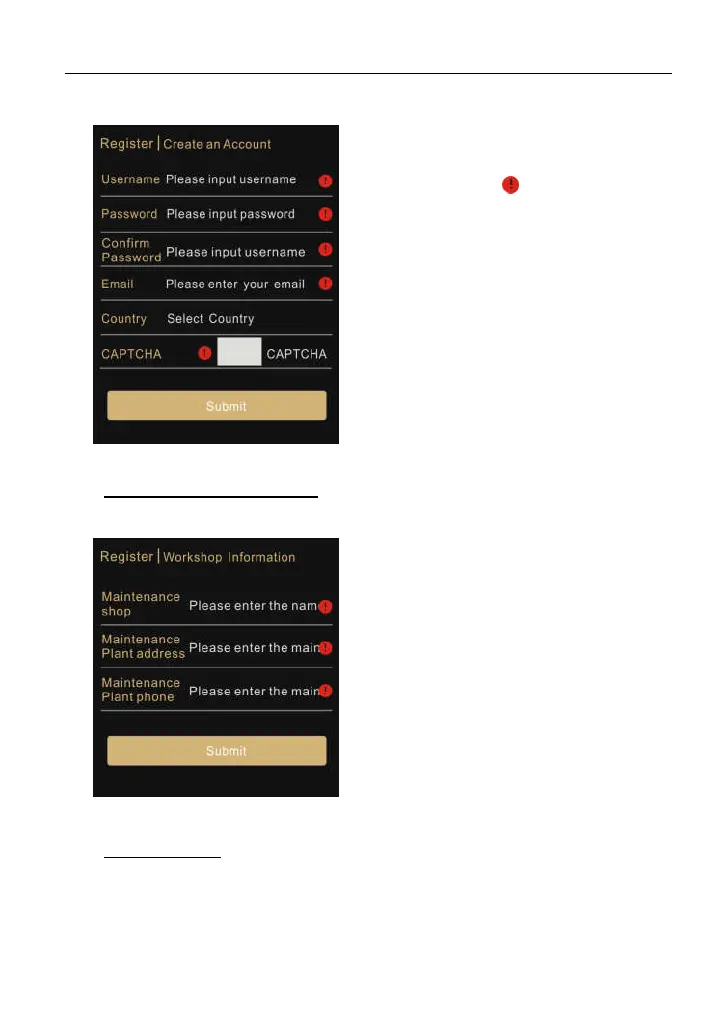
Fig. 4-2
Fill in the information in each field.
*Notes:
The items with must be filled.
Tap “Select Country” to select the
desired area from the list or directly
input the country name to locate it.
Tap “CAPTCHA” to obtain the
verification code.
After filling, tap “Submit” to go to Step
2.
2. Fill in Workshop Information: Enter the workshop information and then tap
“Submit” to advance to the next step.
Fig. 4-3
*Notes:
The workshop information that you
set here will be synchronized with the
same option of “Personal Center” ->
“Settings” -> “Print Information”.
All the information about your
workshop will be appended to the
diagnostic report once a diagnostic
session is generated.
3. Activate Device: Input the Product Serial Number and Activation Code, and
then tap “Activate” to go to Step 4.



 To Next Page