mc²36 xp Installation & Service GuideVersion: 1.0/122/59
4. The Hardware
4.12 Internal Wiring
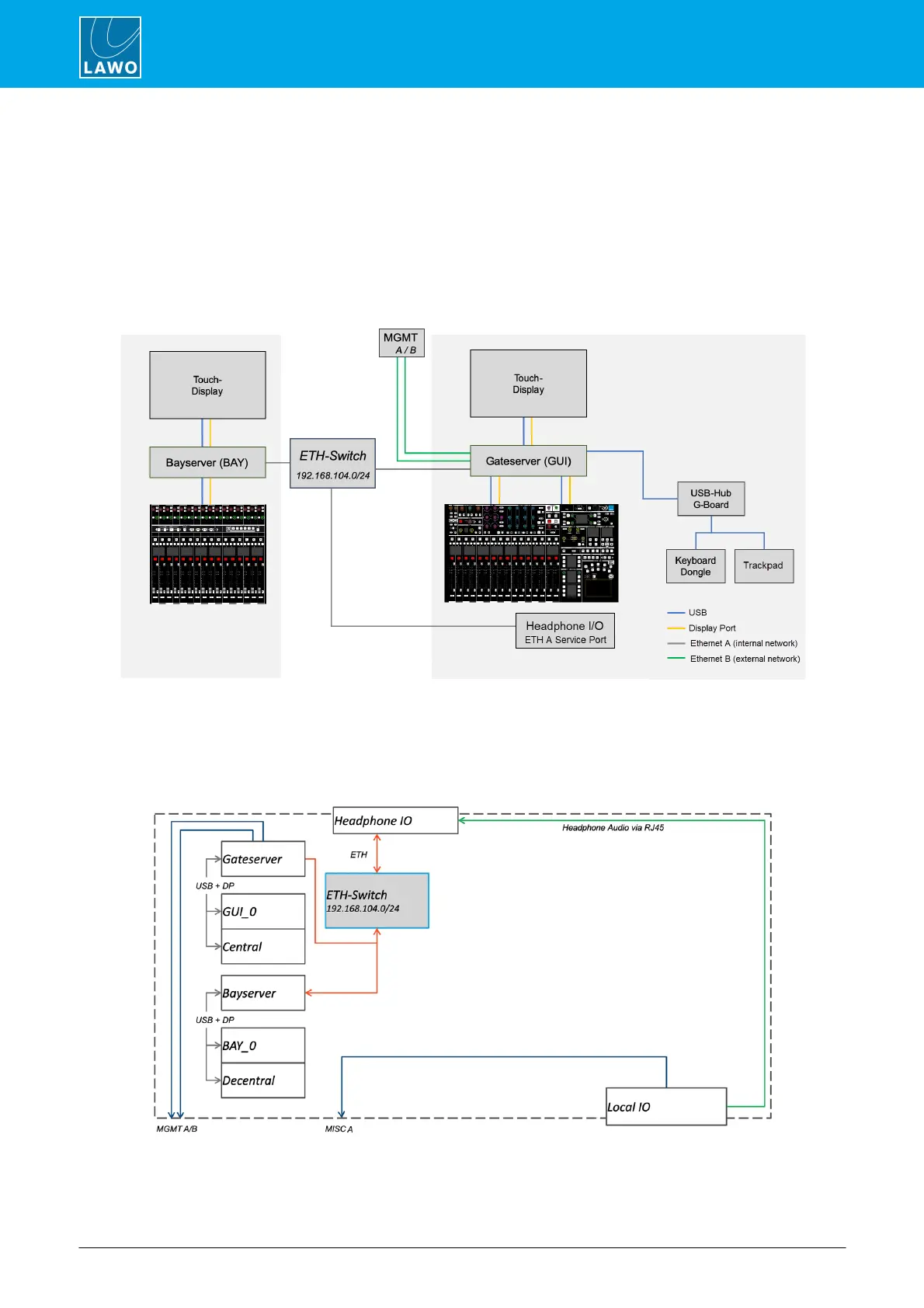
Internally, the control surface uses point-to-point connections, within each bay, to provide fault tolerance and
convenient servicing. Any bay or panel can be isolated from the rest of the console, allowing panels and displays
to be replaced during operation.
Firstly, within each bay, individual panels and displays connect to an Ethernet server mounted inside the frame:
either a Bayserver (in channel bays) or Gateserver (in the centre section). The connections are made using both
USB and Display Port. In the centre section, there is also a USB hub which connects to the console keyboard
and trackpad.
Secondly, each server connects to an Ethernet switch to form what is known as the internal network or
ETHERNET A.
The Gateserver acts as a bridge between the internal and external networks. It handles all of the control data for
the complete surface and also hosts the mc
2
control system.



 To Next Page