mc²36 xp Installation & Service GuideVersion: 1.0/140/59
6. Service Procedures
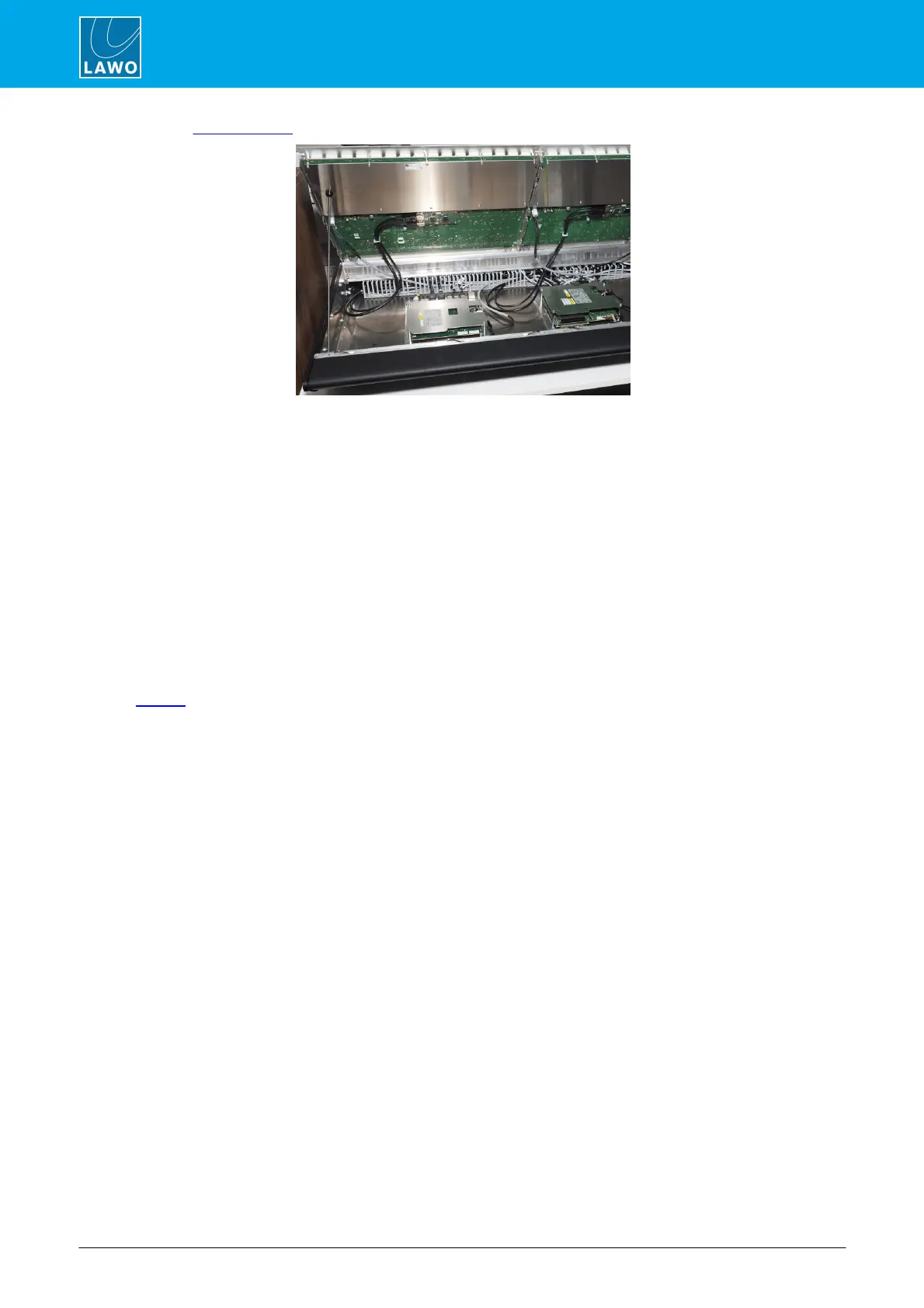
3. Use the Hood Fastener to keep the panel in place while you work:
Fader Panel (976/10)
4. Remove the connectors, taking note of where each one is fitted.
The Fader Panel (976/10) has 1 x Display Port, 1 x USB and 1 x power.
The Double Fader Panel (977/11) has 2 x Display Port, 2 x USB and 1 x power.
The Central Panel (976/20) has 2 x Display Port, 2 x USB and 2 x power, plus two further connectors for the
panel's Talkback XLR and USB port.
5. Carefully remove the panel by lifting it out of the frame. Lay it it face-down on a piece of foam, or similar
ESD-proof protective material, away from the console.
6. Check that the rotary switch settings on your replacement panel are correct - they should both be set to
0, irrespective of the frame position. For more details, please see the 36MKII xp data sheet.
7. Insert and reconnect the replacement panel, and fasten the screws back into place.
Once the control surface is powered, the panel will boot within a few seconds.
8. Restart the bay's server to refresh the communication with the control system.



 To Next Page