T
utorial
mc²66 V1.3/0 45/ 68
Renaming the Production
To rename the production:
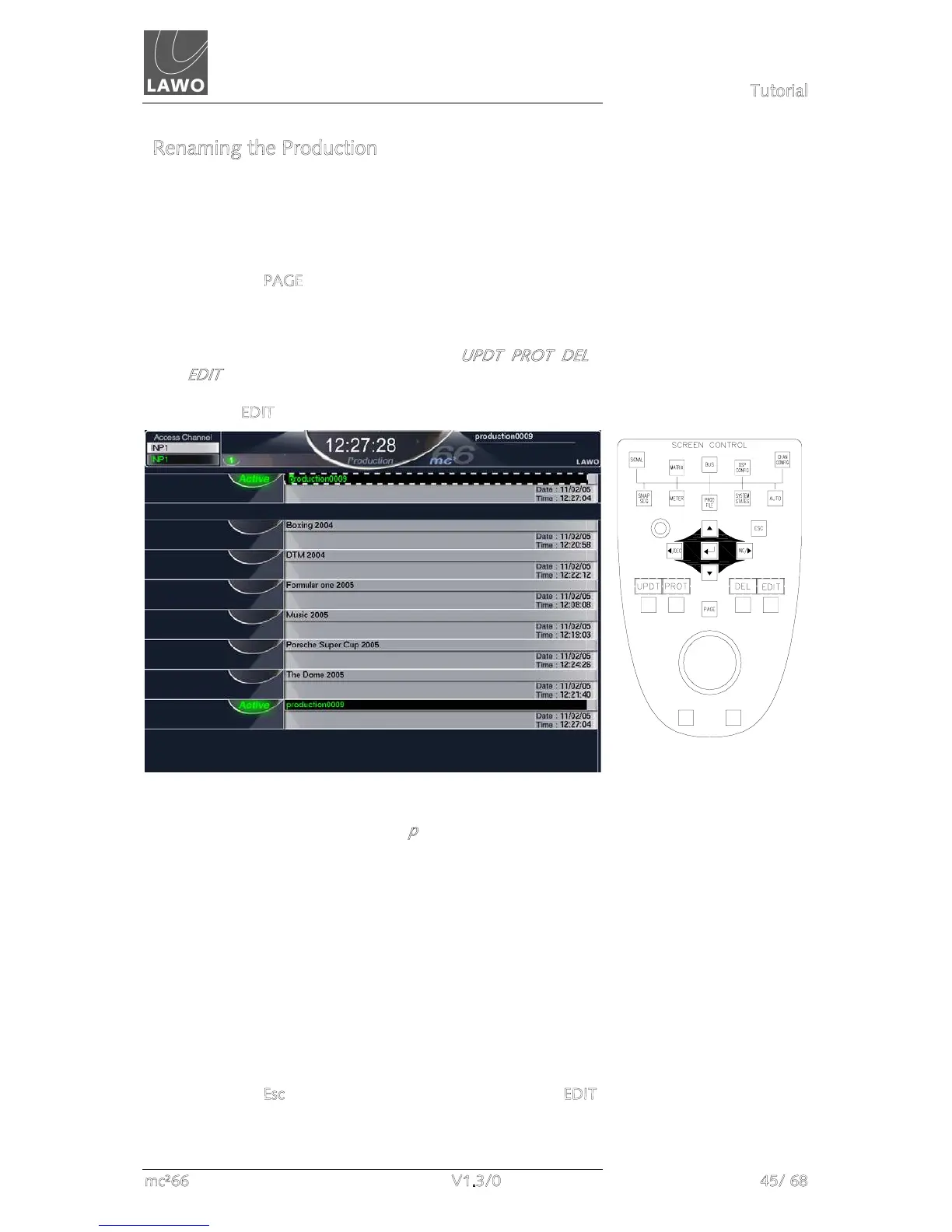
1. Using the trackball or navigation buttons focus on the
Active production name at the top of the display.
2. Press the PAGE button, located in the middle of the
SCREEN CONTROL soft keys, to access the second level
of soft key functions.
The four soft key functions update to show UPDT, PROT, DEL
and E
DIT.
3. Press EDIT:
A green cursor appears highlighting the first letter of the
existing name, in this case the letter p
.
4. Edit the name by typing a new name on the keyboard.
Note that as you type, you overwrite the existing name.
Therefore, rather than worrying about deleting existing
characters, type your new name and then press the space
bar to remove any remaining characters from the name.
5. When you have finished, press the Enter button on the
keyboard to confirm the new name.
This completes the naming operation.
6. If you make a mistake or want to exit the naming mode,
press the E
sc button on the keyboard or deselect the EDIT
button.


 To Next Page