PAGE 8
Next, the full scale reading of the meter should be calibrated. With the transceiver turned on, enter
menu mode, and rotate the SELECT knob until menu item 60 “MTR ARX SEL” is showing. Now rotate
the main tuning knob until “FS” is displayed. This tells the transceiver to output a full-scale reading signal
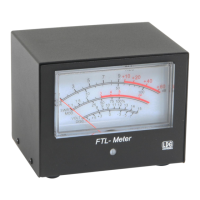
on the meter jack, for calibration. Verify that the needle is now resting on the very right-hand edge of the
red portion of the S-meter scale, just to the right of the +60 mark.
If the full scale reading requires adjustment, insert a small flat blade screwdriver into the hole marked
“FS” on the rear of the FTL-Meter, and turn the potentiometer gently left or right until the needle is exactly
in the correct position on the meter.
The meter is now calibrated, and further calibration should not be necessary.
Receive Parameter Selection
With the transceiver still in menu mode, on menu #60, “MTR ARX SEL”, rotate the main tuning knob
to choose which radio parameter is displayed on the FTL-Meter during receive operation. There are four
options from which to choose:


 To Next Page