EasyManua.ls Logo

Leader Electronics Corp. LBO-522 - General Appearance; Display Block

Default Icon
26 pages
Print Icon
To Next Page IconTo Next Page
To Previous Page IconTo Previous Page
Loading...
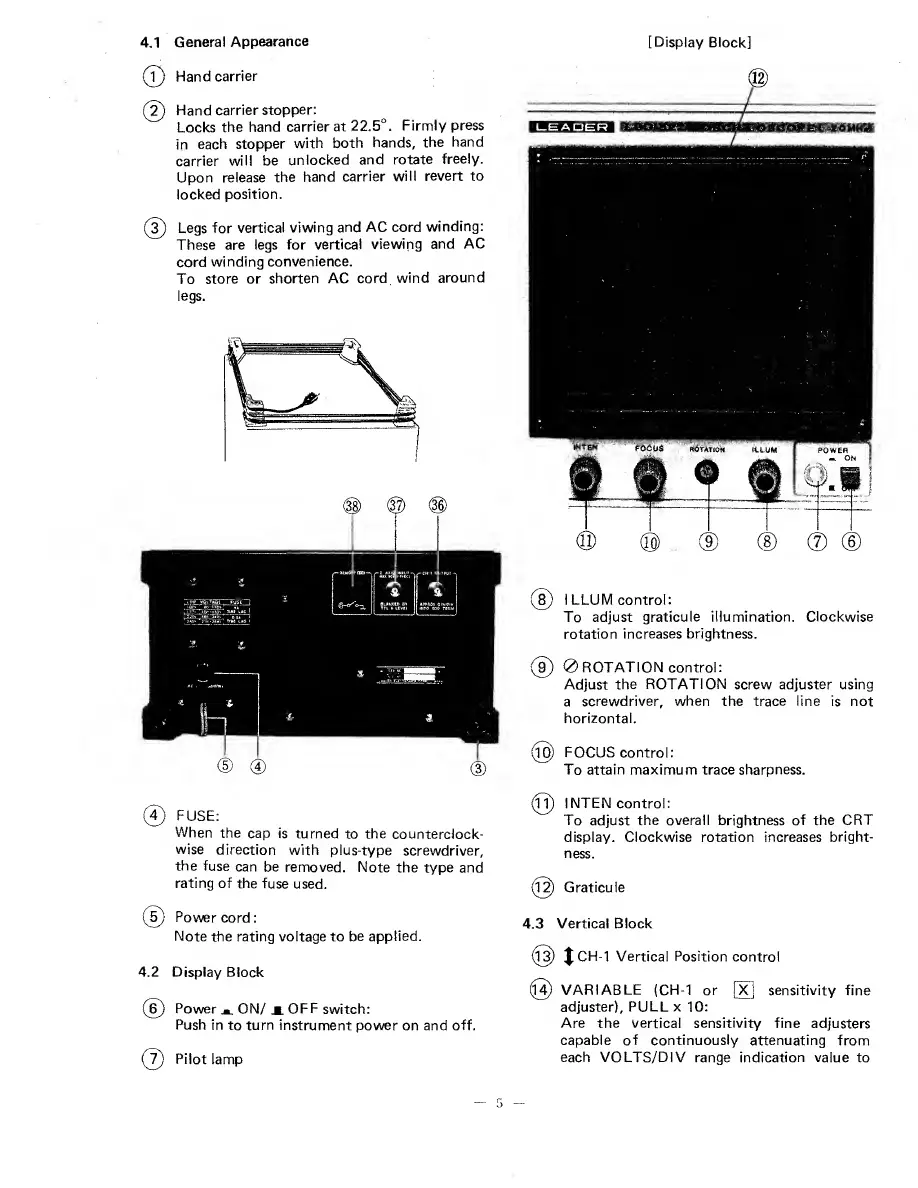
4.1
G
eneral
Appearance
(?)
Hand
carrier
(2)
Hand
carrier
stopper:
Locks
the
hand
carrier
at
22.5°.
Firmly
press
in
each
stopper
with
both
hands,
the
hand
carrier
will
be
unlocked
and
rotate
freely.
Upon
release
the
hand
carrier
will
revert
to
locked
position.
(
3
)
Legs
for
vertical
viwing
and
AC
cord
winding:
These
are
legs
for
vertical
viewing
and
AC
cord
winding
convenience.
To
store
or
shorten
AC
cord
wind
around
legs.
©
F
U
SE:
When
the
cap
is
turned
to
the
counterclock¬
wise
direction
with
plus-type
screwdriver,
the
fuse
can
be
removed.
Note
the
type
and
rating
of
the
fuse
used.
(
5
)
Power
cord:
Note
the
rating
voltage
to
be
applied.
4.2
D
i
splay
Block
(6)
Power
a
ON/ji.
OFF
switch:
Push
in
to
turn
instrument
power
on
and
off.
(7)
Pilot
lamp
[Display
Block]
(8)
I
L
LUM
control:
To
adjust
graticule
illumination.
Clockwise
rotation
increases
brightness.
(§)
0
ROTATION
control:
Adjust
the
ROTATION
screw
adjuster
using
a
screwdriver,
when
the
trace
line
is
not
horizontal.
(©
FOCUS
control:
To
attain
maximum
trace
sharpness.
(R)
INTEN
control:
To
adjust
the
overall
brightness
of
the
CRT
display.
Clockwise
rotation
increases
bright¬
ness.
{©
Graticule
4.3
V
ertical
Block
(l3)
JCH-1
Vertical
Position
control
©
VARIABLE
(CH-1
or
[X]
sensitivity
fine
adjuster),
PULL
x
10:
Are
the
vertical
sensitivity
fine
adjusters
capable
of
continuously
attenuating
from
each
VOLTS/DIV
range
indication
value
to