5
IMPORTANT
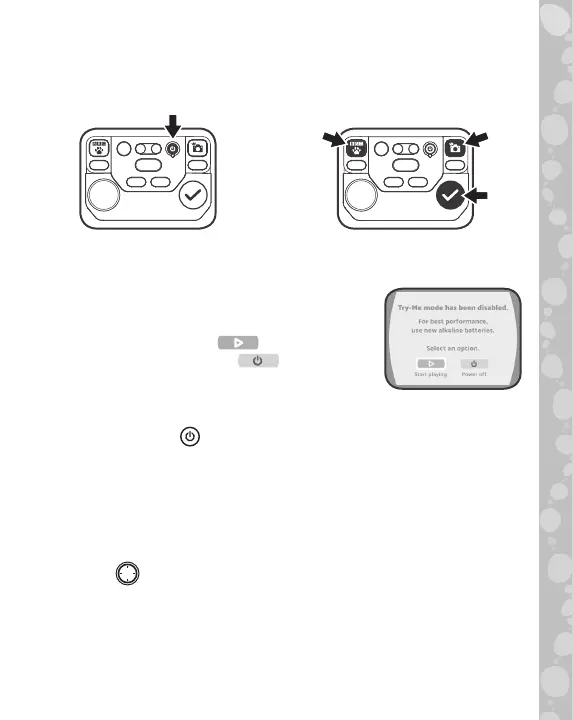
The unit is in Try-Me mode. To exit this mode, follow the steps below:
1. Press the Power Button to
turn on the unit.
2. During the video, press and hold
these three buttons together for
5 seconds.
3. If Try-Me mode has been successfully turned off, “Try-Me mode
has been disabled” will appear on the screen. If not, power off and
repeat steps 1 and 2.
4. On the “Try-Me mode has been disabled”
screen, there are 2 options to select:
• Select the Play icon to start playing.
• Select the Power icon to power off
the device.
PRODUCT FEATURES
1. Power Button
Press the Power Button to power on the Magic Adventures™
Binoculars.
• It may take up to 3 seconds for the device to power on if a
microSD card is inserted.
• Hold down the Power Button for approximately 1 second to
power off the device.
2. D-Pad
Press the D-Pad to highlight an item on the Menu screen. While in
Camera mode or Night Vision mode, press the D-Pad to change
the settings. While playing the Adventure Game, press the D-Pad
to move around the screen.
While viewing an image or a video in the BBC Field Guide, press
the D-Pad to view a different image or video.


 To Next Page