7
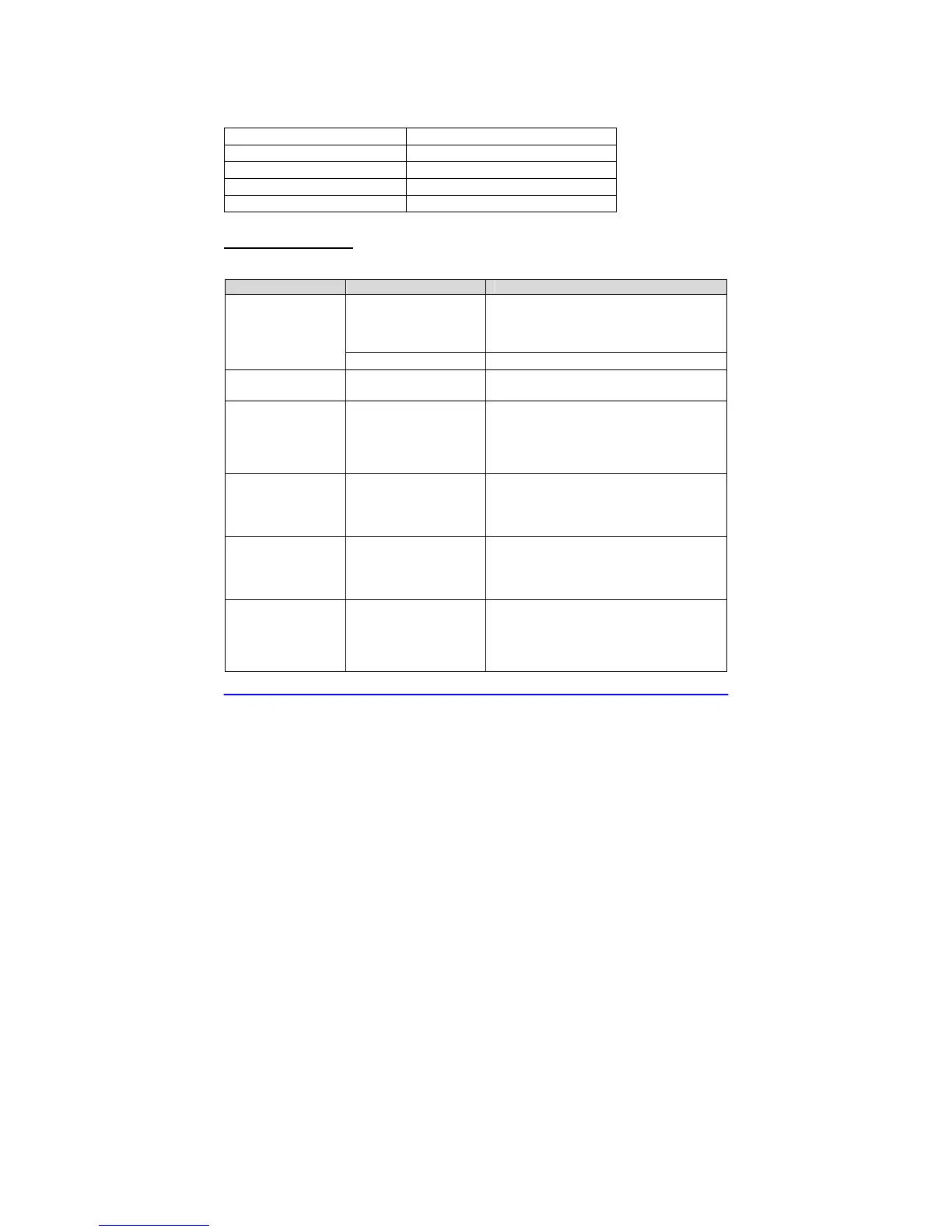
Technical Information
Specifications
Unique Fan Sounds 10
Unique White Noises 10
Speaker Compensation multi-band parametric EQ
Power Requirements 5 Volts, 500 mA, DC
Product Dimensions 4.4” x 4.4” x 2.2”
Trouble Shooting
If your unit exhibits a problem, try the actions below to resolve the problem.
SYMPTOM POSSIBLE CAUSE SOLUTION
Unit Plugged In?
Check that the USB cable is firmly
plugged into the Power Adapter, and the
Power Adapter is plugged into an AC
outlet.
No operation when
power switch is
pressed
Faulty wall outlet
Try another AC wall outlet.
Unit is On, but no
sound
Volume is set too low
Press or hold Volume Up Button down to
increase the Unit’s volume level.
The Unit goes On
immediately when I
plug it in!
This mode is set by
default to allow you to
use an AC power timer
You can disable this function by 1) Turn
Unit Off 2) Press and hold down Volume
Down Button 3) Press and release
Power Button 4) Release Volume Down
Button
I want a noise
sound but I hear a
fan sound
You are in the
“Fan Mode”
Press the “Noise Button” to enter Noise
Mode. Press repeatedly and you will
step through all the White Noises. Stop
when you find your favorite.
I want a fan
sound but I hear a
white noise
You are in the
“Noise Mode”
Press the “Fan Button” to enter Fan
Mode. Press repeatedly and you will
step through all the fan sounds. Stop
when you find your favorite.
Other unexpected
behavior
Try the “factory reset”
procedure
1) Plug Power Plug into an AC outlet
2) Press Power Button to turn Off
3) Press and hold the Power Button
4) Release Power Button when Unit
makes a ”whoop” sound.


 To Next Page