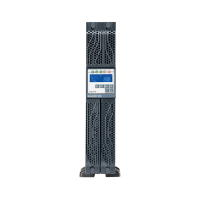
The Niky 1000/1500 is an uninterruptible power supply (UPS) designed to provide reliable power to data processing equipment. This manual serves as a comprehensive guide for users, offering detailed instructions for installation, operation, and maintenance. It is crucial to read this handbook carefully and follow all instructions to ensure proper functioning and longevity of the UPS.
Function Description
The primary function of the Niky 1000/1500 UPS is to supply stable and continuous power to connected equipment, particularly during mains power fluctuations or outages. It acts as a buffer between the mains supply and your sensitive electronic devices, protecting them from power surges, sags, and complete blackouts. The UPS is equipped with an Automatic Voltage Regulator (AVR) which allows it to feed the load with a stabilized output voltage even when the mains voltage fluctuates.
In the event of an overload, the UPS incorporates an electronic protection system that triggers a shutdown to prevent damage. This system measures the power delivered at the outlet and activates protection and signals when set thresholds are exceeded. The shutdown is automatic and its delay is proportional to the size of the overload. For instance, under line mode, if the overload reaches 100% ± 10%, the UPS will shut down after 5 minutes and enter fault mode. If the overload is 110% ± 10%, it will shut down immediately. Similar protective measures are in place for battery mode, with shutdowns occurring after 5 seconds or immediately depending on the overload level.
The UPS also features EMI/RFI filtering, which is essential for protecting electronic appliances from damage caused by electromagnetic radio frequency interferences resulting from poor quality mains supply. A dedicated filter is integrated to eliminate these disturbances.
Usage Features
The Niky 1000/1500 is designed for civil or industrial use, providing a range of features to enhance usability and protection:
- Installation: To set up the UPS, first remove it from its packing. Verify that the mains supply voltage matches the indication on the label at the rear of the unit. The UPS should be switched on using the ON/OFF button, and its operation with mains power (indicated by a green LED) should be confirmed. After switching off the UPS, connect the load power cable to the UPS output sockets located on the right side. Then, switch on the UPS and the connected load to ensure correct operation. For optimal battery performance, it is recommended to keep the UPS on for 8 hours to fully recharge the battery before initial use. While the UPS can be used before a full charge, the backup time during a blackout will be shorter.
- Signals and Controls: The front panel of the UPS features LED indicators and acoustic signals to communicate its status:
- LED1 (Green): A fixed green light indicates that mains power is present and regular. A green flashing light every 2 seconds signifies that the batteries are recharging.
- LED2 (Yellow): A fixed yellow light indicates that there is no mains power, and the UPS is running on battery.
- LED3 (Red): A fixed red light indicates an overload alarm.
- LED4 (Red Flashing): A red flashing light every 0.5 seconds indicates that the autonomy is in reserve.
- Acoustic Signals: An intermittent sound every 2 seconds means the UPS is running on battery. An intermittent sound every 0.5 seconds signals an overload or autonomy in reserve. A continuous sound indicates a failure or a generic alarm.
- Self-Test: The UPS performs an automatic self-test every time it is switched on, ensuring reliable operation.
- DC Start Capability: The UPS can be switched on in DC mode (battery operation), provided the connected load does not exceed 80% of the UPS's rated power.
- Full Time Surge Protection Outlet: For appliances that do not require backup protection, such as printers or fax machines, the UPS includes a surge-protected outlet located at the back of the unit.
- Software Connection: The Niky 1000/1500 is equipped with both RS232 (DB9 cable required) and USB interfaces. These interfaces allow a computer to access operational data from the UPS and control the operating system for unattended shutdown. Software for various operating systems (Win98/ME/2000, Novell, and Linux) is available for free download from the manufacturer's website, and a user license is included with the product.
- Telephone Protection: An integrated, standard RJ11/RJ45 passing telephone connection provides protection for telephone or network equipment (modems, telephones, etc.) against overvoltage.
Maintenance Features
Proper maintenance ensures the longevity and optimal performance of your Niky 1000/1500 UPS:
- Battery Protection: The UPS includes automatic battery test and deep discharge protection features to safeguard the battery's health.
- Changing Batteries: Battery replacement should only be performed by specialized technical personnel. Before changing batteries, switch off the UPS using the ON/OFF button on the front panel and unplug the power cable from the mains socket. Replace the batteries with others of the same type and make, or with equivalent features. It is crucial to keep batteries away from fire to prevent explosions. Do not open or tamper with the battery case, as it contains toxic electrolyte that can be harmful. Batteries are considered hazardous waste and must be disposed of according to current regulations.
- Ventilation: To dissipate heat effectively, ensure that the ventilation slits on the UPS are kept clean and unobstructed.
- Troubleshooting (Possible Malfunctioning): The manual provides guidance for common issues:
- UPS always operates on batteries: This could be due to no line voltage, line voltage being outside the allowed UPS range, incorrect connection of the power supply cable to the mains socket, a tripped input circuit breaker that needs resetting, or a defective mains socket.
- UPS signals overloading: This indicates that additional loads beyond the normal capacity have been connected to the output line. Users should check all connected loads.
- UPS doesn't operate in battery mode (shuts down or signals low operating limit): This can happen if the UPS has operated without mains voltage for an extended period and hasn't recharged the battery. It should be recharged for at least 6 hours by connecting it to the mains. A flat battery due to prolonged non-use also requires a 6-hour recharge. If the battery has run down due to frequent use, ambient conditions, or exceeding its average service life, it needs to be replaced.
- UPS doesn't deliver power to the output: Users should check that the loads are correctly connected to the output sockets.
Important Considerations:
- The UPS NIKY is not designed for electro-medical equipment and does not conform to the standards for such use.
- The total load applied to the UPS must not exceed the capacity indicated on its rear label.
- The ON/OFF button does not electrically isolate internal parts; to fully isolate the UPS, unplug it from the mains power socket.
- Do not open the UPS container, as it may contain dangerously high voltage even when disconnected from the mains. There are no user-serviceable parts inside.
- The UPS should be operated in closed, clean rooms, free from inflammable liquids, corrosive substances, and excessive humidity.
- Avoid placing the UPS near equipment that generates strong electromagnetic fields or near equipment sensitive to such fields (e.g., engines, floppy disks, speakers, adapters, monitors, video equipment).
- Do not pour any liquid on or inside the UPS, or place it in humid environments or near liquids.
- Protect the UPS from direct sunlight and heat sources.
- Always use a grounded power cable to connect the UPS to the mains supply.
- Avoid plugging laser printers into the UPS due to their high start-up current.
- Do not plug household electric equipment like hair dryers, air conditioners, or refrigerators into the UPS outlets.
- When wiring the outlet line, ensure the total cable length from the UPS to the farthest utility does not exceed 10 meters.
- Never disconnect the 230 V power plug while the UPS is operating, as this would disconnect the earthing protection for both the UPS and connected loads.

 Need help?





 To Next Page
 General