Group 7 Data/Programming Page 148
Release R2.0 LEIBINGER JET3
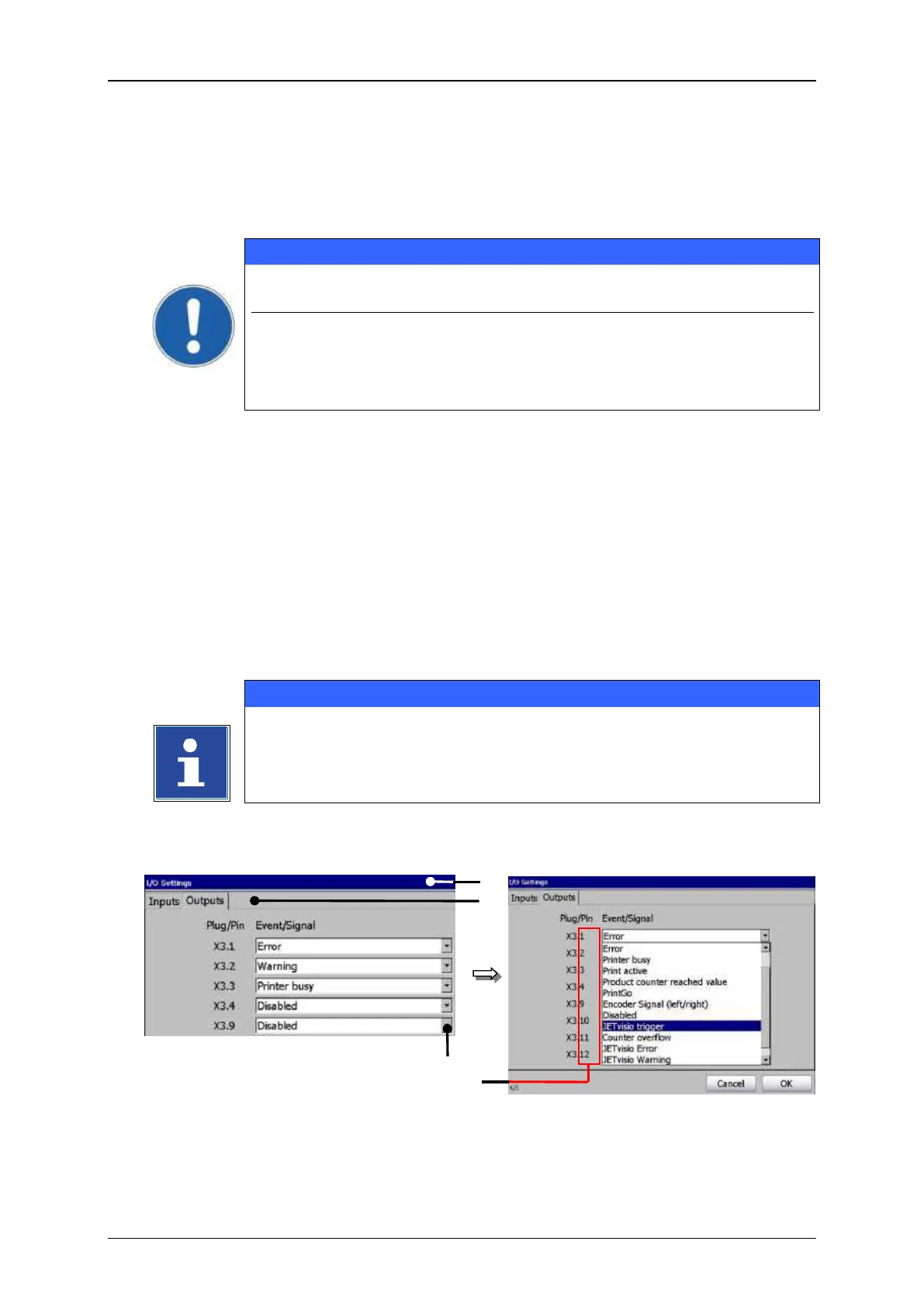
With the tab <Outputs> you can assign printer states and messages to the available
outputs.
Standardly the outputs 1-3 are already predefined!
Output 1 (X3.1) = Print stop error
Output 2 (X3.2) = Refill warning
Output 3 (X3.3) = Ready to print
E.g.: The output 5 (X3.9 (of the Pin No. 9 of interface X3)) should be assigned to the
JET Viso trigger function.
Press on the tab <Outputs> (2) to select the tab.
Press on the arrow key of the drop-down list of the output 5 [X3.9] (3). The drop-
down list provides a list of events/signals for selection.
Now select the required event/signal.
You will find further information also in the chapter Interface X3
(Outputs)!
Assign functions and messages to digital outputs
1 – Dialog box <I/O Settings>
3 – Drop-down list <X3.9>



 To Next Page