EasyManua.ls Logo

Leibinger Jet 3 - Font Selection for Objects

Leibinger Jet 3
378 pages
Print Icon
To Next Page IconTo Next Page
To Previous Page IconTo Previous Page
Loading...
Group 8 Job editor Page 228
Release R2.0 LEIBINGER JET3
8.3.3 Close job editor
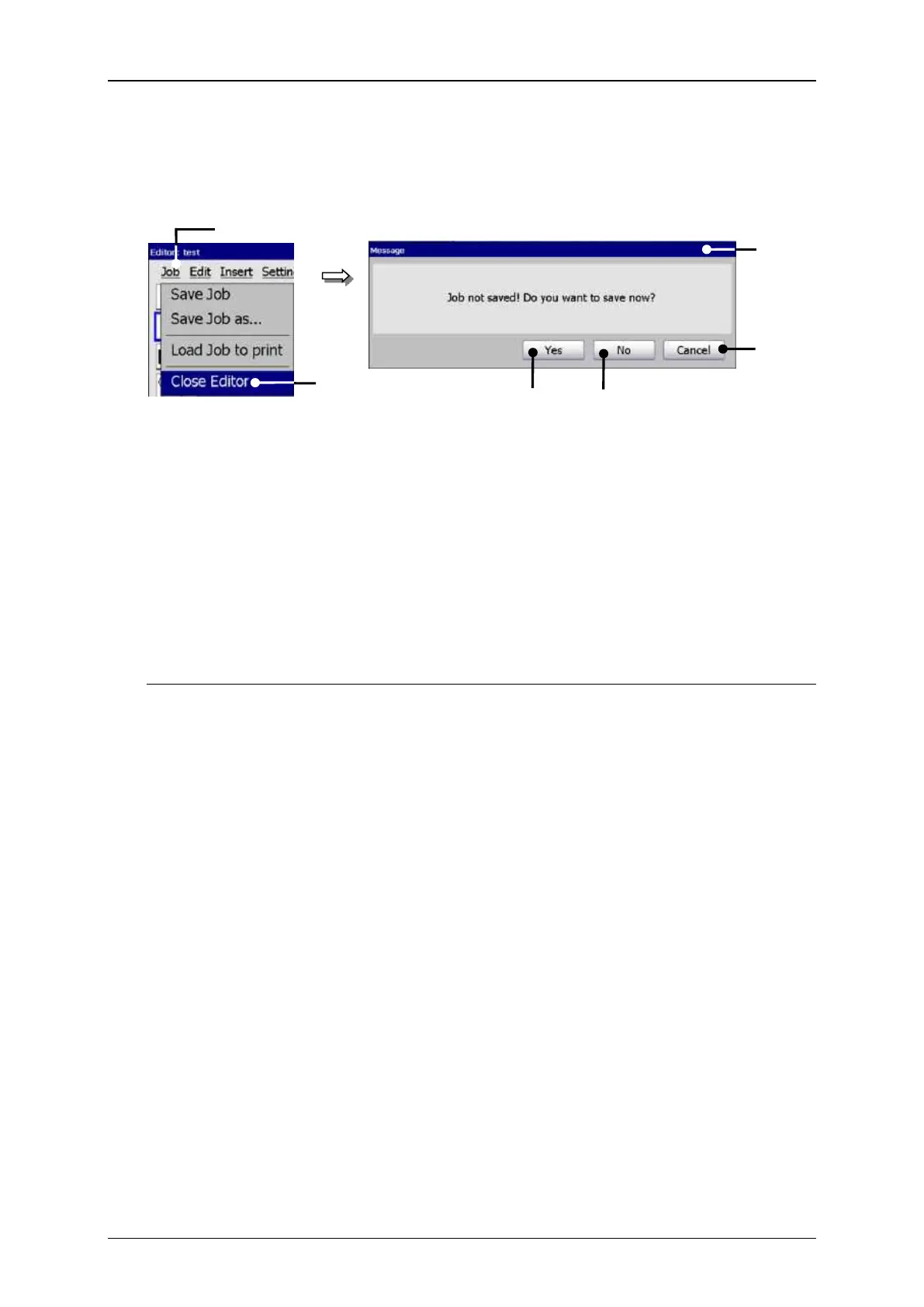
Figure 119
Close job editor
1 Button <Job>
4 Button <Cancel>
2 Option <Close Editor>
5 Button <No>
3 Safety query
6 Button <Yes>
With the option <Close Editor> you can close the job editor.
If changes have been carried out at the opened job, an accordant safety query (3) is
faded in.
In this case the following possibilities are available:
Press the button <Cancel> (4) to abort the process and to go back to the editor.
Press the button <No> (5) to leave the editor without saving the job.
Press the button <Yes> (6) to save the job when leaving the editor. Attention!
The saving happens under the current data file name. The existing data will be
overwritten!

1
2
4
6
3
5

Related product manuals