Select Export from the Home Menu. Tap within the section Details and select
TS Calibration.
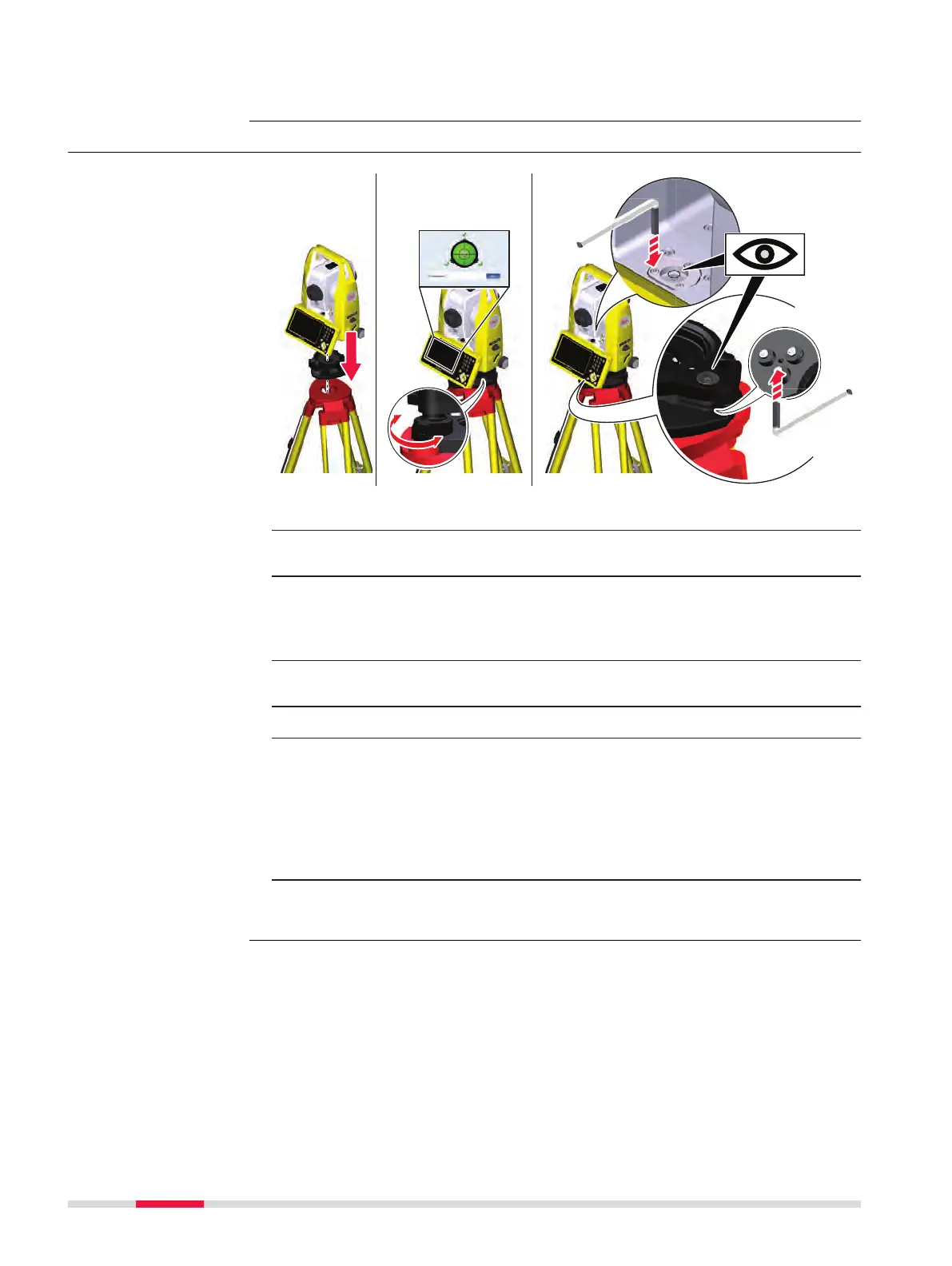
5.4 Adjusting the Circular Level of the Instrument and Tribrach
1. Place and secure the instrument into the tribrach and onto a tripod.
2. Turn on the instrument. Using the tribrach footscrews, level the
instrument with the electronic level.
☞
Electronic level:
•
Select Devices from the Home Menu.
•
Tap the arrow button to the right of the device name.
•
To display the electronic level, tap Compensator.
3. Check the position of the circular level on the instrument and tri-
brach.
☞
If both circular levels are centred, no adjustments are necessary.
4. If one or both circular levels are not centred, adjust as follows:
Instrument: If it extends beyond the circle, use the supplied allen
key to centre it with the adjustment screws. Turn the instrument by
200 gon (180°). Repeat the adjustment procedure if the circular
level does not stay centred.
Tribrach: If it extends beyond the circle, use the supplied allen key
to centre it with the adjustment screws.
☞
After the adjustments, all adjusting screws must have the same
tightening tension and no adjusting screw should be loose.
Adjusting the circular
level step-by-step
40 Check & Adjust


 To Next Page