Hardware and Software Setup
13
LEICA SR20 User Manual-1.1.0en
Powering Up the Unit
The SR20 operates on a single battery. Once a battery is
fully charged, you are ready to power up the SR20.
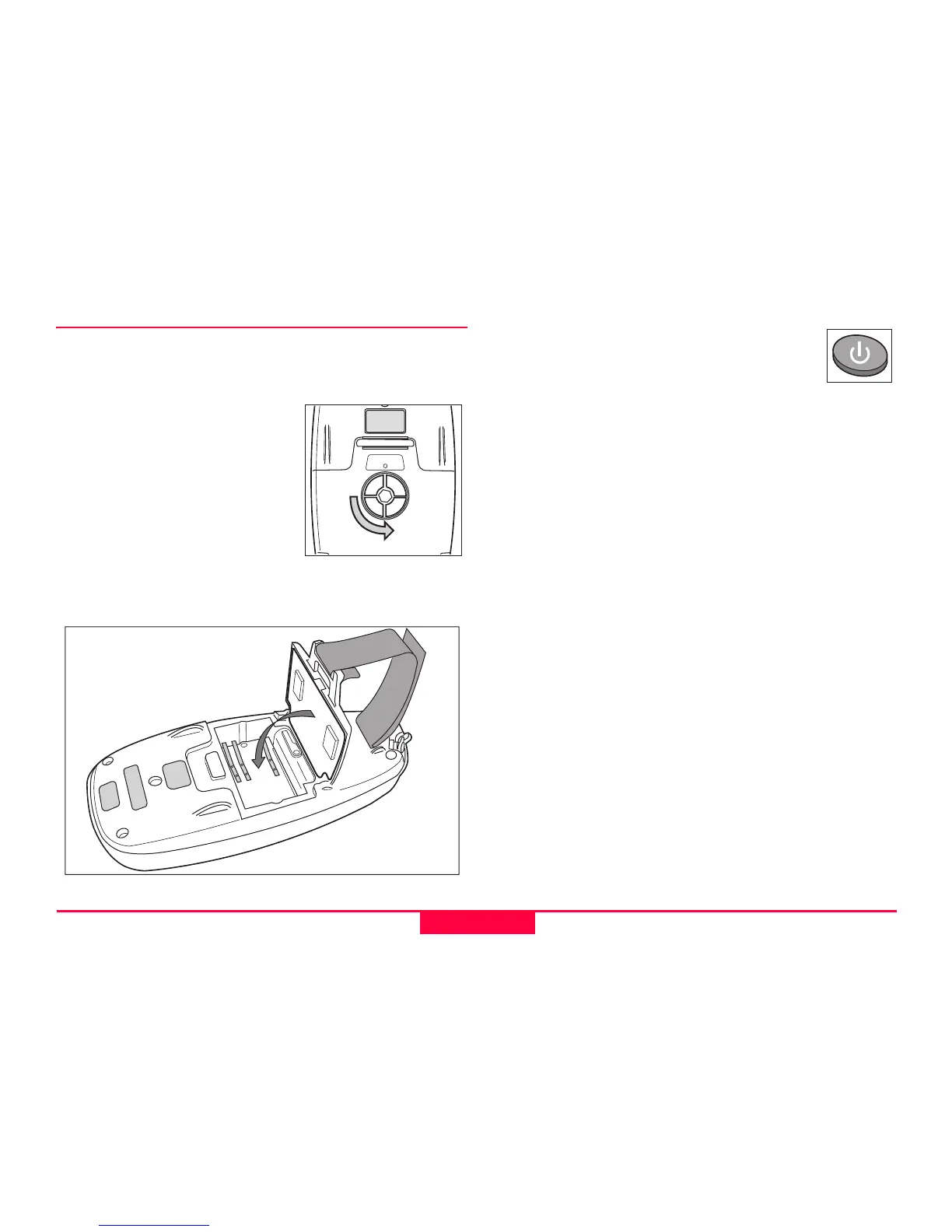
1. Open the SR20 Battery door
by turning the door latch 90
degrees counterclockwise,
and pull open the battery
door.
2. Place the battery in the well
with the gold contacts facing
down and making contact.
3. Shut the battery door and
return the latch to the locked position with the spin
arrow facing upward toward the dot on the housing.
4. On the keypad, depress the Power Button
in the Lower Left corner. Startup will be
followed by an audible tone, then after a
memory check (2 to 3 seconds) the SR20
Splash Screen will be followed by the Main Menu.
5. Once the Main Menu appears, the receiver will begin to
search and acquire satellites.
)
Make sure that the SR20 has a clear view of the sky!
Initially the GPS unit will not have an Almanac (The
almanac is a library of satellite orbits that helps the GPS
locate the satellites more quickly). When using the unit for
the first time, or after a long period without use, it may take
several minutes to acquire a position; this is known as a
“Cold Start”.
)
Please refer to the SR20 Getting Started Guide for
information on basic functions and data collection.



 To Next Page