EN
132
Picture mode
11 FIELD METERING
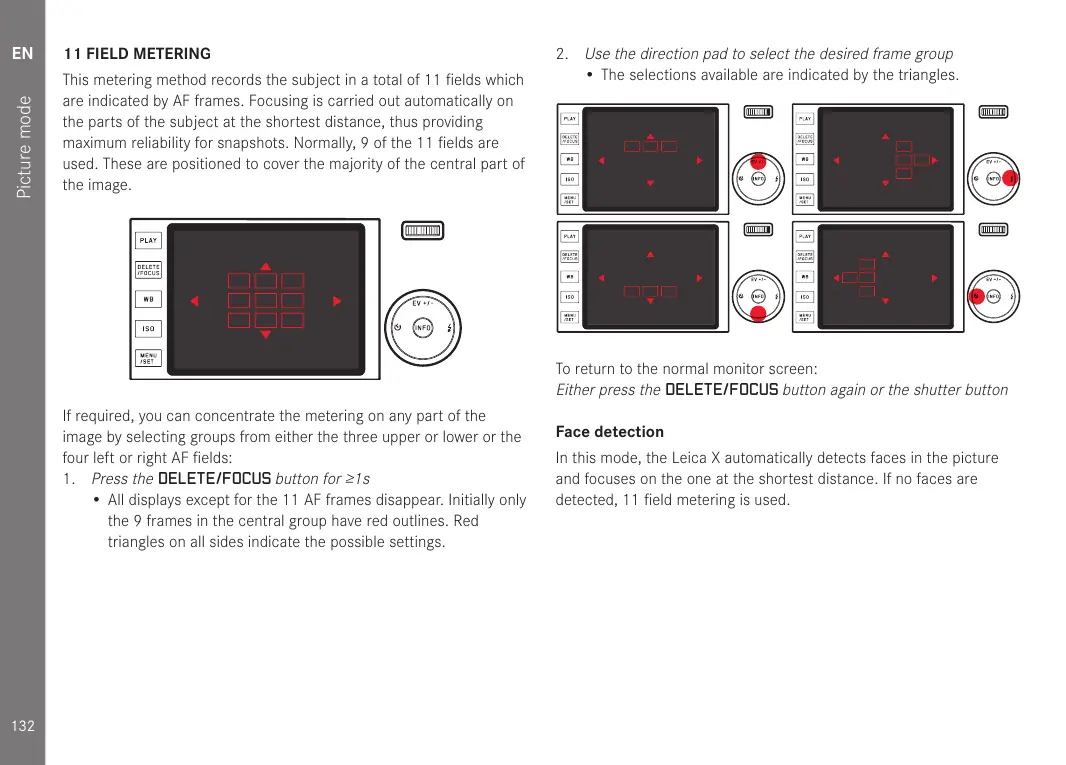
This metering method records the subject in a total of 11 fields which
are indicated by AF frames. Focusing is carried out automatically on
the parts of the subject at the shortest distance, thus providing
maximum reliability for snapshots. Normally, 9 of the 11 fields are
used. These are positioned to cover the majority of the central part of
the image.
If required, you can concentrate the metering on any part of the
image by selecting groups from either the three upper or lower or the
four left or right AF fields:
1.
Press the
DELETE/FOCUS
button for ≥1s
• All displays except for the 11 AF frames disappear. Initially only
the 9 frames in the central group have red outlines. Red
triangles on all sides indicate the possible settings.
2.
Use the direction pad to select the desired frame group
• The selections available are indicated by the triangles.
To return to the normal monitor screen:
Either press the
DELETE/FOCUS
button again or the shutter button
Face detection
In this mode, the Leica X automatically detects faces in the picture
and focuses on the one at the shortest distance. If no faces are
detected, 11 field metering is used.


 To Next Page