EN
140
Picture mode
EXPOSURE COMPENSATION
Some subjects are made up of predominantly of excessively light or
dark surfaces, for example large areas of snow or a full-format black
steam locomotive. In
P, T, and A exposure modes, it may be more
useful in such cases to set an appropriate exposure compensation
instead of using exposure lock each time. The same applies if you
want to ensure an identical exposure for several pictures.
1.
Press up
EV+/-
on the direction pad once
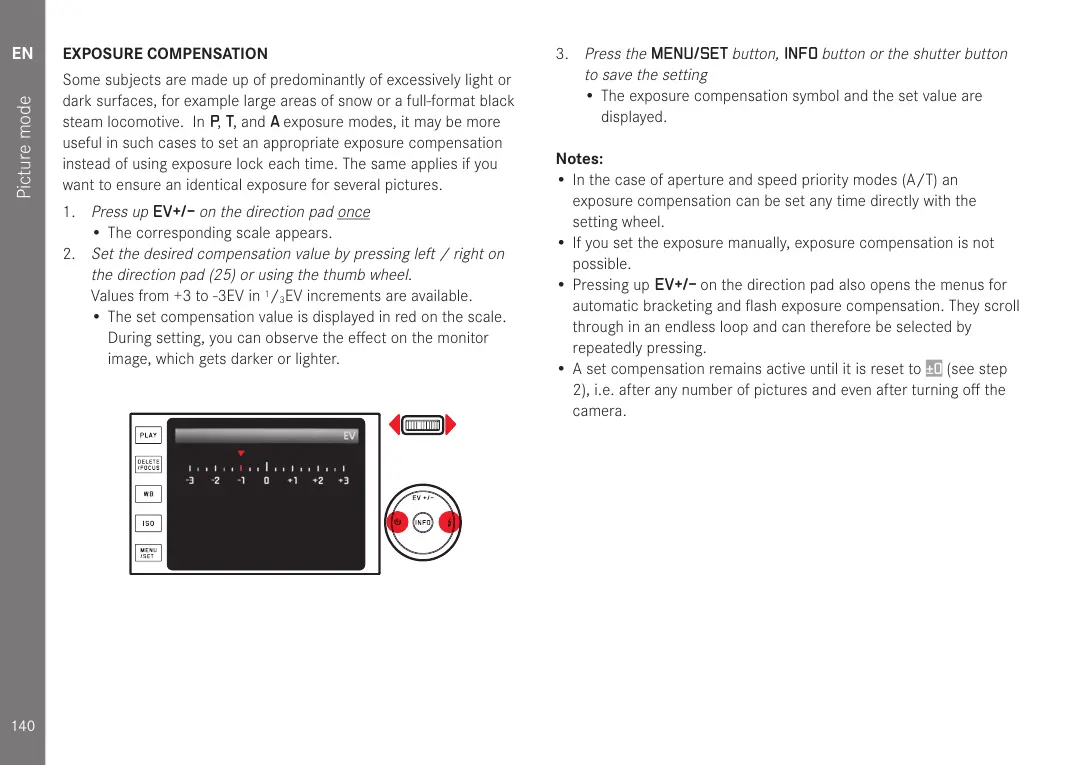
• The corresponding scale appears.
2.
Set the desired compensation value by pressing left / right on
the direction pad (25) or using the thumb wheel.
Values from +3 to -3EV in
1
/
3
EV increments are available.
• The set compensation value is displayed in red on the scale.
During setting, you can observe the effect on the monitor
image, which gets darker or lighter.
3.
Press the
MENU/SET
button,
INFO
button or the shutter button
to save the setting
• The exposure compensation symbol and the set value are
displayed.
Notes:
• In the case of aperture and speed priority modes (A/T) an
exposure compensation can be set any time directly with the
setting wheel.
• If you set the exposure manually, exposure compensation is not
possible.
• Pressing up
EV+/- on the direction pad also opens the menus for
automatic bracketing and flash exposure compensation. They scroll
through in an endless loop and can therefore be selected by
repeatedly pressing.
• A set compensation remains active until it is reset to
±0 (see step
2), i.e. after any number of pictures and even after turning off the
camera.


 To Next Page