62
Appendix II Frame Mortise & Tenon Jig User Guide
JIG ADJUSTMENTS
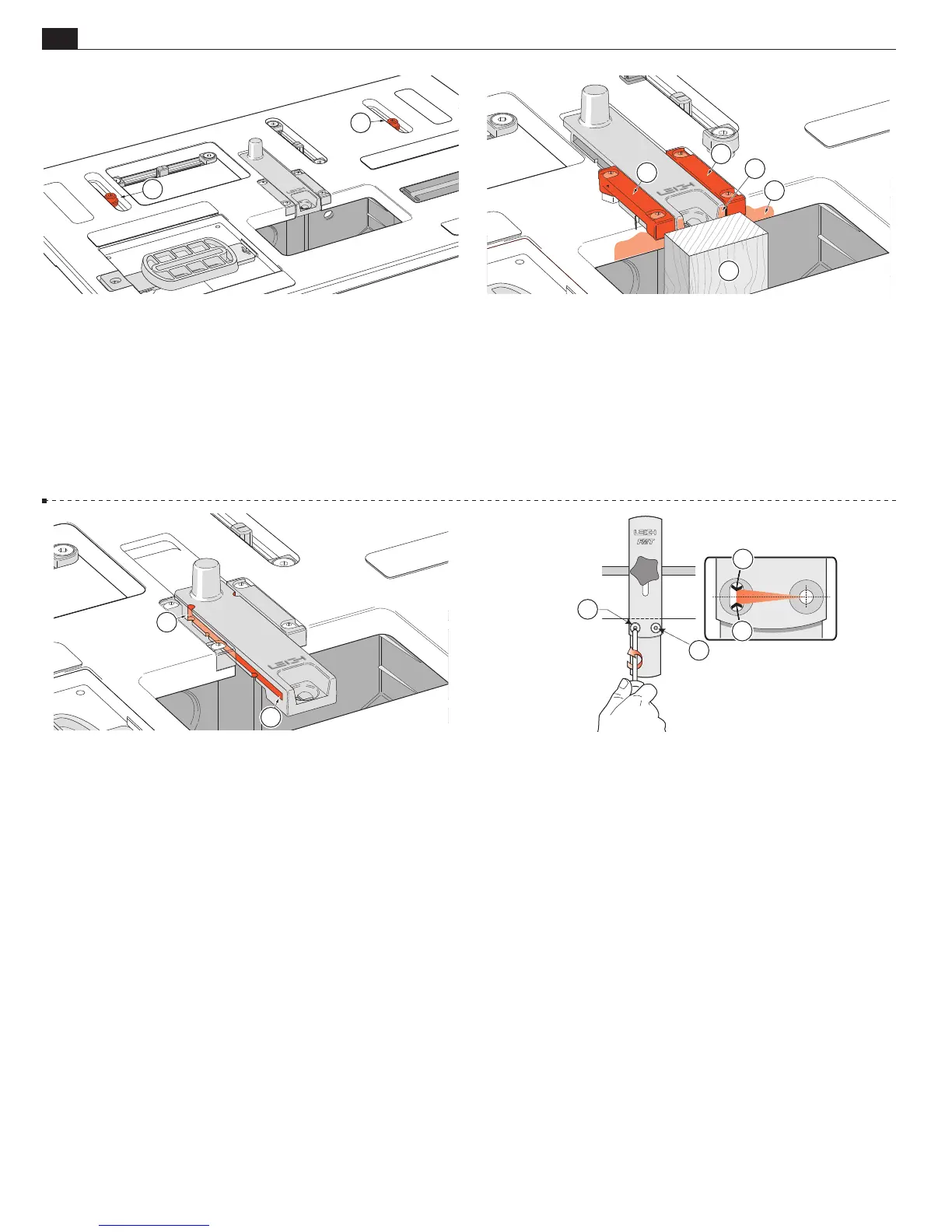
A2-5 Table Clamp Setting
The setting for this is factory pre-set
using a torque tool. Should you need to adjust the pressure, lock
the table and lightly tighten the two clamp screws equally
➀
. Do
not adjust these screws with the table unlocked. You should be
able to work the table lock lever with quite light pressure. When
locked, it should not be possible to move the table with firm side
to side hand and arm pressure. When unlocked, it should be easy
to position the table without sticking. The screws are treated with
Loctite™ to prevent accidental rotation.
1
1
A2-6 Sight Position
The sight position is factory set. If you
ever need to reset it here’s how. Clamp a straight vertical rail that
projects through the table bit opening
➀
. Slightly loosen the
four small hex cap screws that hold the two sight rails
➁
using
the provided hex key. Move the table forward until the rear edge
of the bit opening
➂
firmly touches the vertical rail
➀
, and lock
the table. Pull the sight and rails against the wood piece
➃
; at the
same time centring the rear end of the sight in the recess. Tighten
the four screws.
2
3
4
2
1
A2-7 Jig Maintenance
Very little maintenance is required. Fine
dust build-up in the front and rear sight stops should be removed
from time to time. The end of the small hex key or a piece of wire
will do the trick. At the front
➀
and with the sight to the rear
position at
➁
. Dusting off with compressed air (if available) will
keep the jig clean.
1
2
A2-8 The sidestop fence is squared at the factory, but check your first
test joints. If your router/bit is not perfectly perpendicular to the table
adjust the sidestop fence: slightly loosen the 'pivot' screw
➀
and the 'lock'
screw
➁
. Adjust the angle
➂
to match the bit and retighten. Rout test
joints to confirm correct setting. Once locked in this position it should
never need adjusting when used with that same router.
■
1
2
3
3


 To Next Page