EasyManua.ls Logo

LEKATO WS-70 - Battery Status and Charging; Checking Battery Capacity; Device Charging Procedure

LEKATO WS-70
6 pages
Print Icon
To Next Page IconTo Next Page
To Previous Page IconTo Previous Page
Loading...
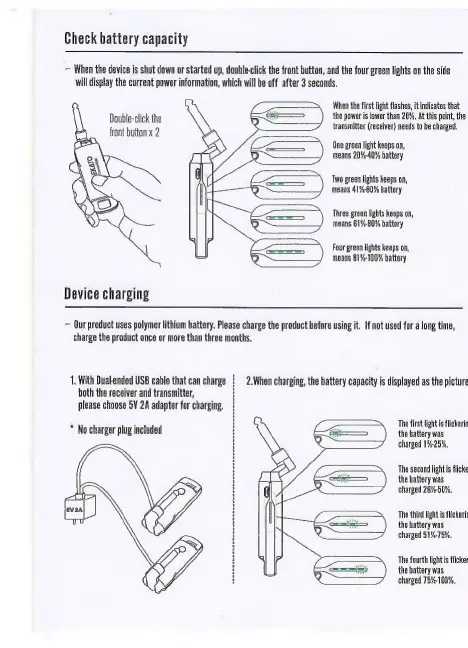
Check
battery
capacity
~
When
the
device
is
shut
down
or
started
up,
double-click
the
front
button,
and
the
four
green
lights
on
the
sidle
will
display
the
current
power
information,
which
will
be
off
after
3
seconds,
——
When
the
first
light
flashes,
it
indicates
that
eli
————
the
power
is
lower
than
20%,
At
this
point,
the
ee
ad
X
transmitter
(receiver)
needs
to
be
charged.
One
green
light
keeps
on,
means
20%-40%
battery
Two
green
lights
keeps
on,
means
41%60%
battery
Three
green
lights
keeps
on,
means
61%-80%
battery
Four
green
lights
keeps
on,
means
81%-100%
battery
Device
charging
Our
product
uses
polymer
lithium
hattery.
Please
charge
the
product
before
using
it.
If
not
used
for
a
long
time,
charge
the
product
once
or
more
than
three
months,
1.
With
Dual-ended
USB
cable
that
can
charge
hoth
the
receiver
and
transmitter,
please
choose
SV
2A
adapter
for
charging.
2.When
charging,
the
battery
capacity
is
displayed
as
the
picture
The
first
light
is
flickerin
the
battery
was
charged
1%-25%.
*
No
charger
plug
included
The
second
light
is
flicke
the
battery
was
charged
26%-50%.
The
third
light
is
flickerin
the
battery
was
charged
51%-75%.
The
fourth
light
is
flicker
the
battery
was
charged
75%-100%.

Related product manuals