EasyManua.ls Logo

LEKATO WS-70 - Device Operation and Testing; Powering the Device On and Off; Pairing and Testing the System; Frequency Hopping for Interference

LEKATO WS-70
6 pages
Print Icon
To Next Page IconTo Next Page
To Previous Page IconTo Previous Page
Loading...
Device
on
/
off
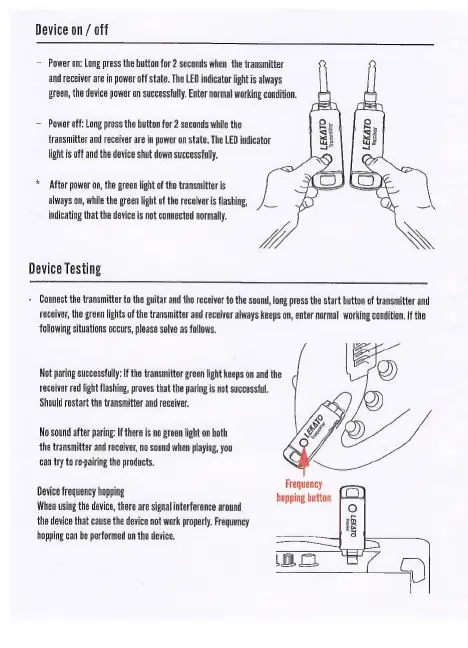
Power
on:
Long
press
the
button
for
2
seconds
when
the
transmitter
and
receiver
are
in
power
off
state.
The
LED
indicator
light
is
always
green,
the
device
power
on
successfully.
Enter
normal
working
condition.
Power
off:
Long
press
the
button
for
2
seconds
while
the
transmitter
and
receiver
are
in
power
on
state.
The
LED
indicator
light
is
off
and
the
device
shut
down
successfully.
*
After
power
on,
the
green
light
of
the
transmitter
is
always
on,
while
the
green
light
of
the
receiver
is
flashing,
indicating
that
the
device
is
not
connected
normally.
Device
Testing
-
Connect
the
transmitter
to
the
guitar
and
the
receiver
to
the
sound,
long
press
the
start
button
of
transmitter
and
receiver,
the
green
lights
of
the
transmitter
and
receiver
always
Keeps
on,
enter
normal
working
condition.
If
the
following
situations
occurs,
please
solve
as
follows,
Not
paring
successfully:
If
the
transmitter
green
light
keeps
on
and
the
receiver
red
light
flashing,
proves
that
the
paring
is
not
successful.
Should
restart
the
transmitter
and
receiver.
No
sound
after
paring:
If
there
is
no
green
light
on
both
the
transmitter
and
receiver,
no
sound
when
playing,
you
can
try
to
re-pairing
the
products.
Frequency
hopping
button
Device
frequency
hopping
When
using
the
device,
there
are
signal
interference
around
the
device
that
cause
the
device
not
work
properly.
Frequency
hopping
can
he
performed
on
the
device.

Related product manuals