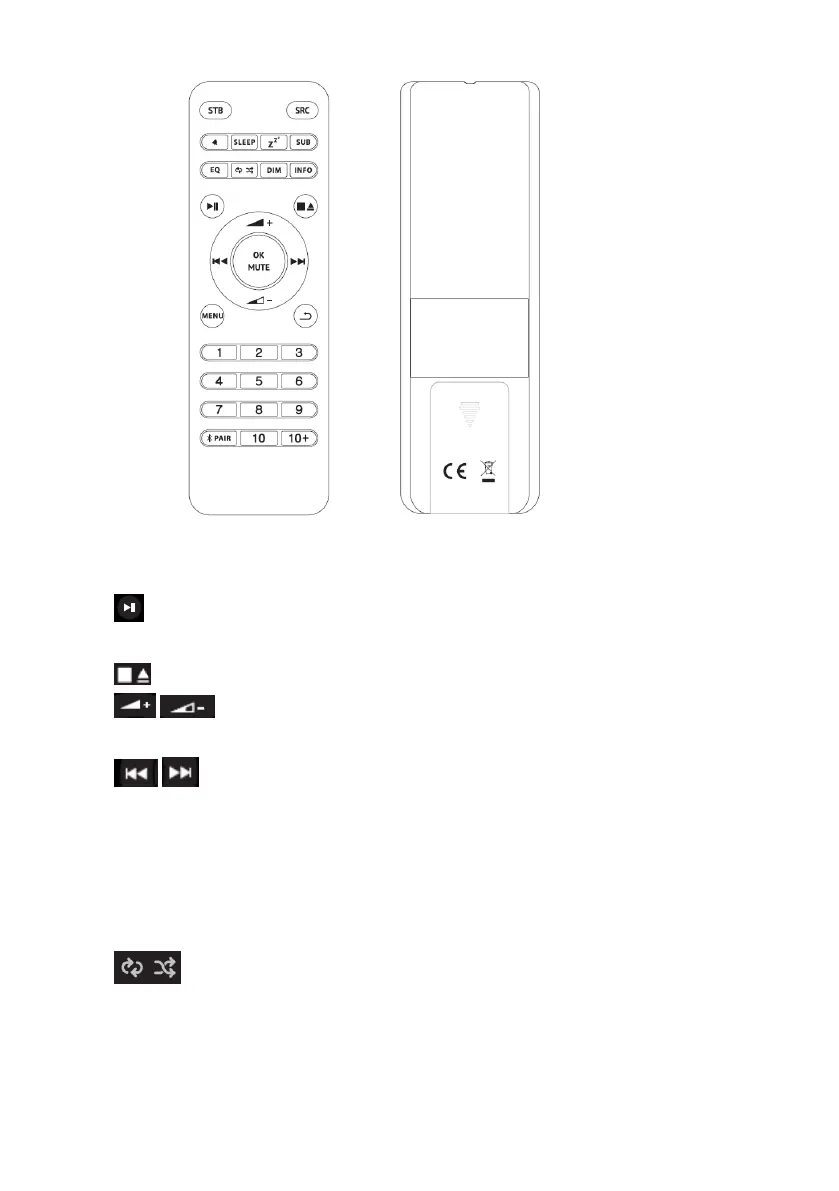
1. 1, 2, 3, 4, 5, 6, 7, 8, 9,10: Short press to preset the stations. For the 10+, it needs
to long press the 10+ and then short press the 1-9 to get the 10+ preset number
2. : Press to play / pause the playing BT mode and CD mode. Auto Scan
stations under DAB and FM mode.
3. : Press to stop CD playback, press again for CD ejection.
4. / : Press to volume up or volume down in playing screen. Press up or
down to select menu for settings.
5. / Press right or left to select mode. In playing screen, press right or left to
select FM, DAB, or CD tracks.
6. OK/MUTE: Long press the button to switch DAB normal playing screen image to
full screen slide show image.
7. SRC: Source button
8. EQ: Adjust the EQ setting.
9. : Repeat & Shuffle play, it is Repeat in CD/USB playback/, it is Shuffle play
in CD mode.
10. Dim: Adjust the display backlight setting
11. PAIR: In Bluetooth mode, it is Bluetooth pairing.
Remark: As the remote is sharing with other models, some functions can not use.


 To Next Page