21
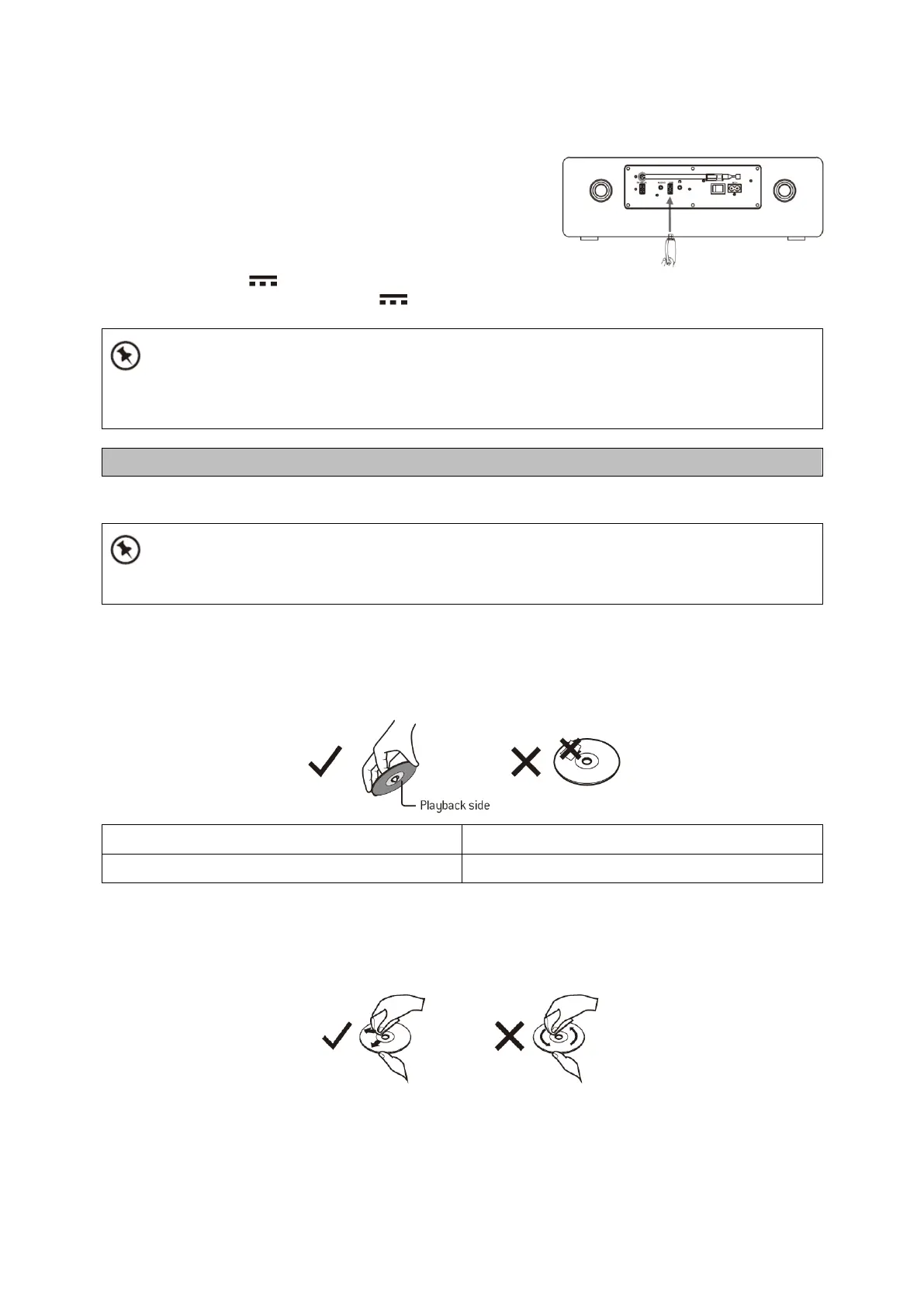
For devices with a USB cable:
1. Insert one plug of the USB cable (not supplied)to the
USB socket at the rear of the unit.
2. Insert the other plug of the USB cable to the USBoutput
terminal of the USB device.
USB charging (5V 1A socket only)
You can plug an USB cable in the 5V 1A USB socket to charge the mobile device.
If the USB device is corrupted, this unit will not be able to detect and play the music stored.
Format the USB mass storage device and restore the music on the device with a computer.
Cleaning the Unit
Ensure the unit is fully unplugged from the mains socket before cleaning.
• To clean the unit, wipe the case with a slightly moist, lint-free cloth.
• Do not use any cleaning fluids containing alcohol, ammonia or abrasives.
• Do not spray an aerosol at or near the unit.
Handling Discs
• Do not touch the playback side of the disc.
• Do not attach paper or tape to the disc.
Cleaning Discs
Fingerprints and dust on the disc cause picture and sound deterioration. Wipe the discfrom the
centre outwards with a soft cloth. Always keep the disc clean.
• If you cannot wipe off the dust with a soft cloth, wipe the disc lightly with a slightly
moistenedcloth and finish with a dry cloth.



 To Next Page