8. PC Connecting
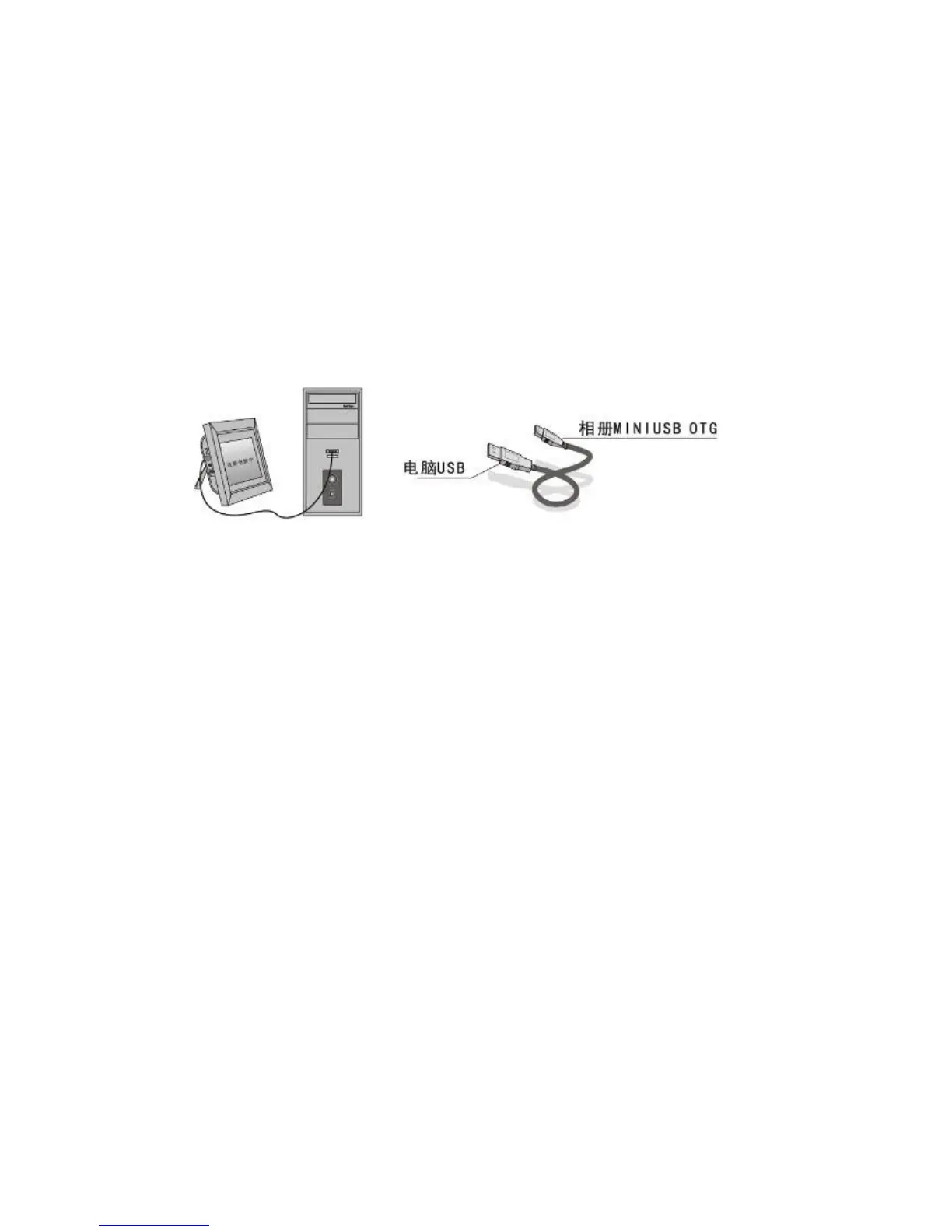
If the unit has built-in memory and MINI USB, you can connect it to external
equipment by using USB cable:
A. Please turn on the digital photo frame, then connect it with your computer
by using USB cable
B. The unit will be automatically detected and it will display " Copy Files......"
information, when you are using Windows 2000/XP, then you can copy
file between built-in memory and the digital photo frame.
Then you need to restart the digital photo frame when you finished the
copy/delete operation.
IMPORTANT: Never disconnect the USB cable while files are transferring.
Doing so may damage your DPF.
9. Technical Specifications
Adapter: Input AC 100-240V 50/60HZ Output DC 12V/3A
Picture Format: JPEG,BMP,GIF
Audio Format: Mp3&WMA
VideoFormat:MPEG1,MPEG2,MPEG4,M-JPEG,Xvid and AVI
Memory Cards: SD/MS/MMC/XD/CF
USB:USB Host( high speed 2.0connected with the long USB Cable); MINI
USB
Screen Parameter:
Screen Size: 12.1 inch TFT
Resolution : 1280*3 RGB *800
Contrast: 300:1
Aspect Ratio: 16:9
Brightness: 300cd/m2
Response Time: 20ms
Working Temperature: 0℃~40℃, Humidity: 10-85%


 To Next Page