Remote Control
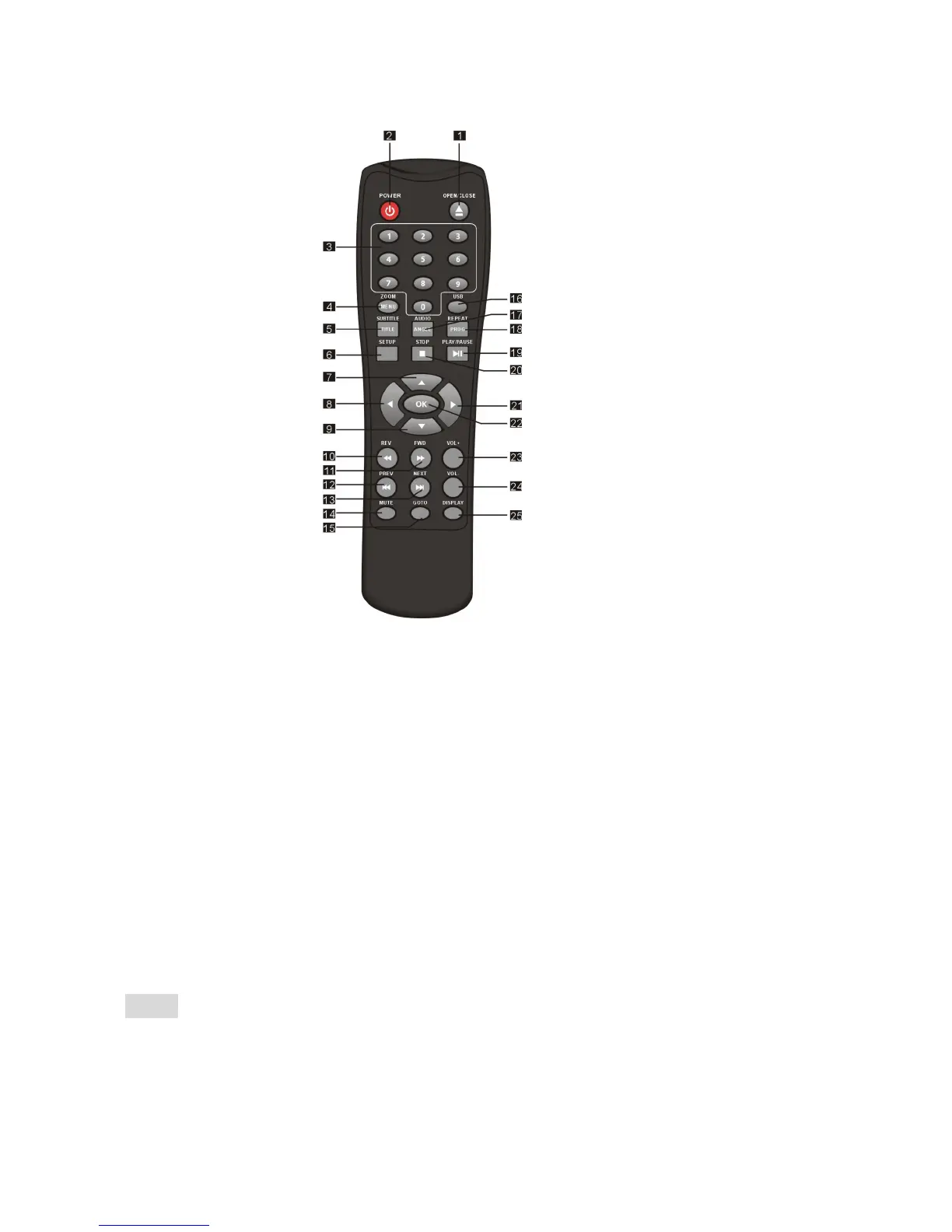
1. OPEN/CLOSE
2. POWER
3. 0-9 NUMBER KEY
4. ZOOM/MENU
5. SUBTITLE/TITLE
6. SETUP
7. UP
8. LEFT
9. DOWN
10. REVERSE
11. FORWARD
12. PREVIOUS
13. NEXT
14. MUTE
15. GOTO
16. USB
17.AUDIO/ANGLE
18.REPEAT/ PROGRAM
19. PLAY/PAUSE
20. STOP
21. RIGHT
22. OK
23. VOLUME INCREASE
24. VOLUME DECREASE
25. DISPLAY
Note:
Press 4, 5, 17, 18 for more than 1.5s, there will be functions marked on these
buttons(MENU, TITLE, ANGLE, PROG).
Press 4, 5, 17, 18 for less than 1s, there will be functions marked above these
buttons(ZOOM, SUBTITLE, AUDIO, REPEAT).


 To Next Page