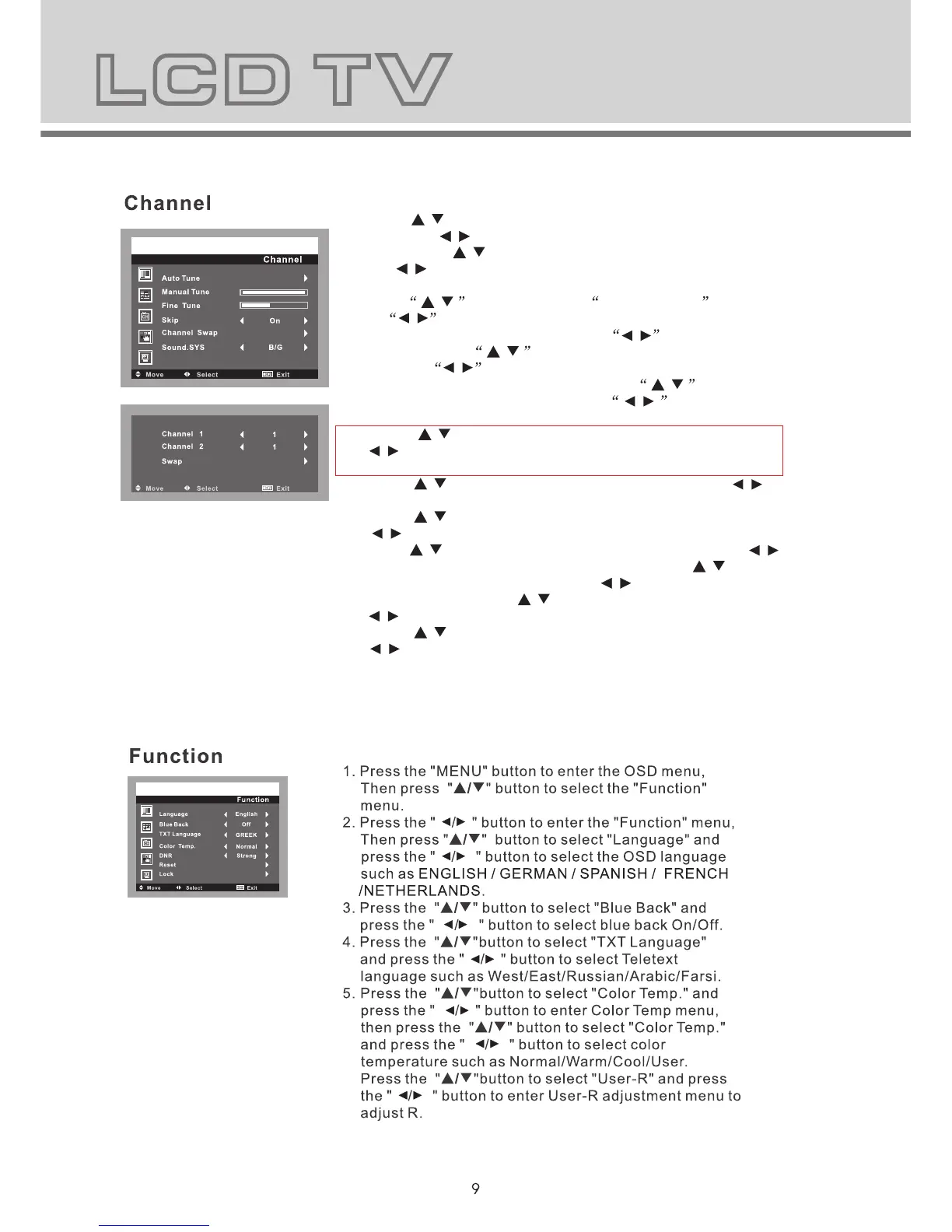
1. Press the "MENU" button to enter the OSD menu,Then
press " / " button to select the "Channel" menu.
2. Press the " / " button to enter the "Channel" menu,
Then press " / " button to select "Auto Tune"and press
the " / " button to enter Auto Tune adjustment menu to
adjust automatic search and memorize into program list.
3. Press / button to select Manual Tune and press
the / button to enter Manual Tune adjustment menu.
Highlight Channel item, press the / button to change
channel, press / button to highlight search item,
press the / button to start channel searching.When
your desired program appears, press / button to
highlight store item and press the / button to
confirm. Press menu button to save and exit.
4. Press " / " button to select "Fine Tune" and press the
" / " button to enter Fine Tune adjustment menu to
adjust for best tuning.
5. Press " / " button to select "Skip" and press the " / "
button to select the skip On/Off.
6. Press " / " button to select "Channel Swap" and press the
" / " button to enter the Channel swap setting.
Press" / " button to select "Channel 1" and press " / "
to select the Channel you wish to edit, Press" / " button
to select "Channel 2" and press" / "to enter the channel
number, Then press " / " button to select"Swap" and press
" / " to swap.
7. Press " / " button to select "Sound.SYS" and press the
" / " button to select the sound system such as BG/I/DK/
L/LL.
8. Press the "Menu" button to return to upper menu.



 To Next Page