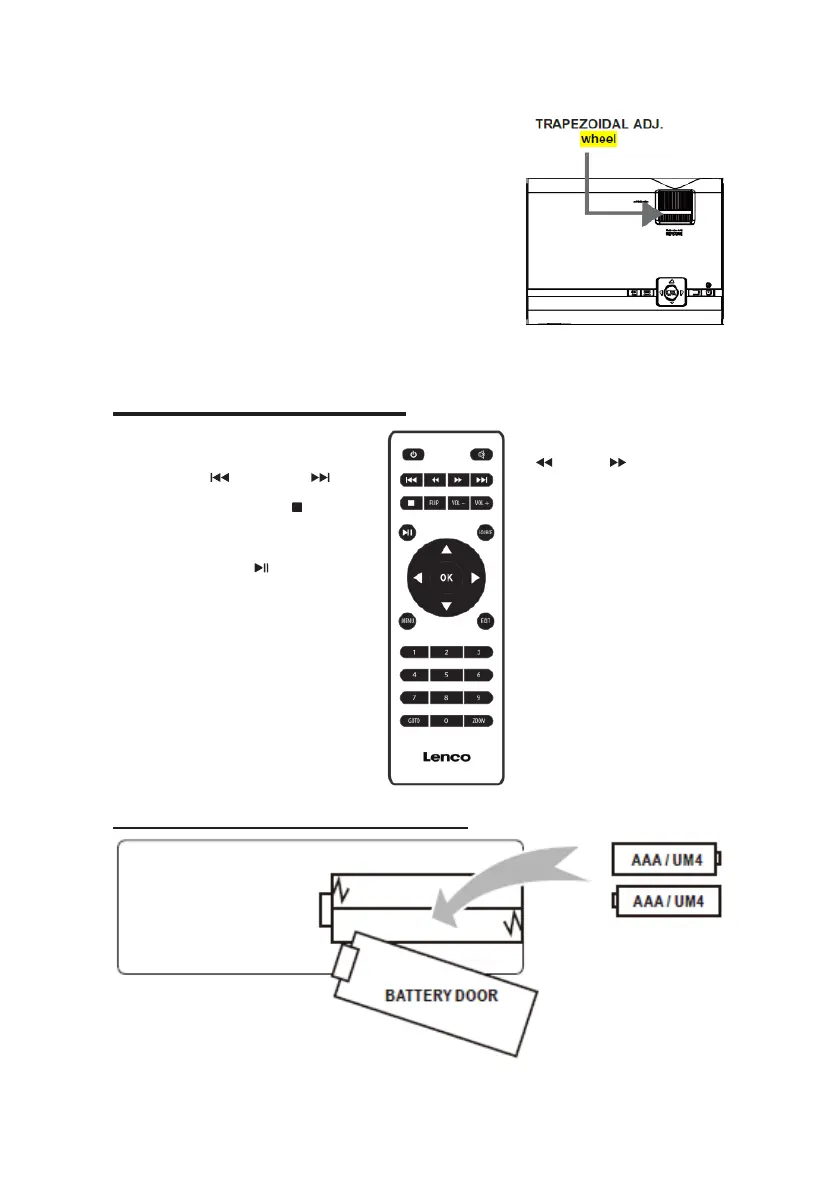
Keystone image is created when the
projector beam is projected to the
screen in an angle. Keystone
correction will restore the distorted
image to a rectangular or square
shape.
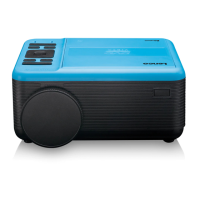
Power
Press to power ON.
Long press to power OFF.
Previous/Next
Press to skip between chapters or tracks.
Stop
Press to stop playback.
Flip
Press to flip display image 180°.
Play/Pause
Press to play or pause an individual chapter
or track.
Arrows/OK
Press to navigate and confirm selections in
Settings and other menus.
Menu
Press to access projector Settings.
Go To/Number Keypad
Press to enter specific chapter or track
numbers. Use Play button to start playing.
Mute
Press to mute volume.
Back/Fwd
Press to search through an individual
chapter or track.
VOL+/VOL−
Press to adjust audio level.
Source
Press to select media source (AV, PC,
HDMI, MEDIA).
Exit
Press to exit menu.
Zoom
Press to zoom display image in or out.
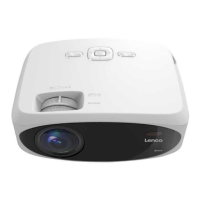
Install/Remove Battery Of Remote


 To Next Page