15
Connect HDMI
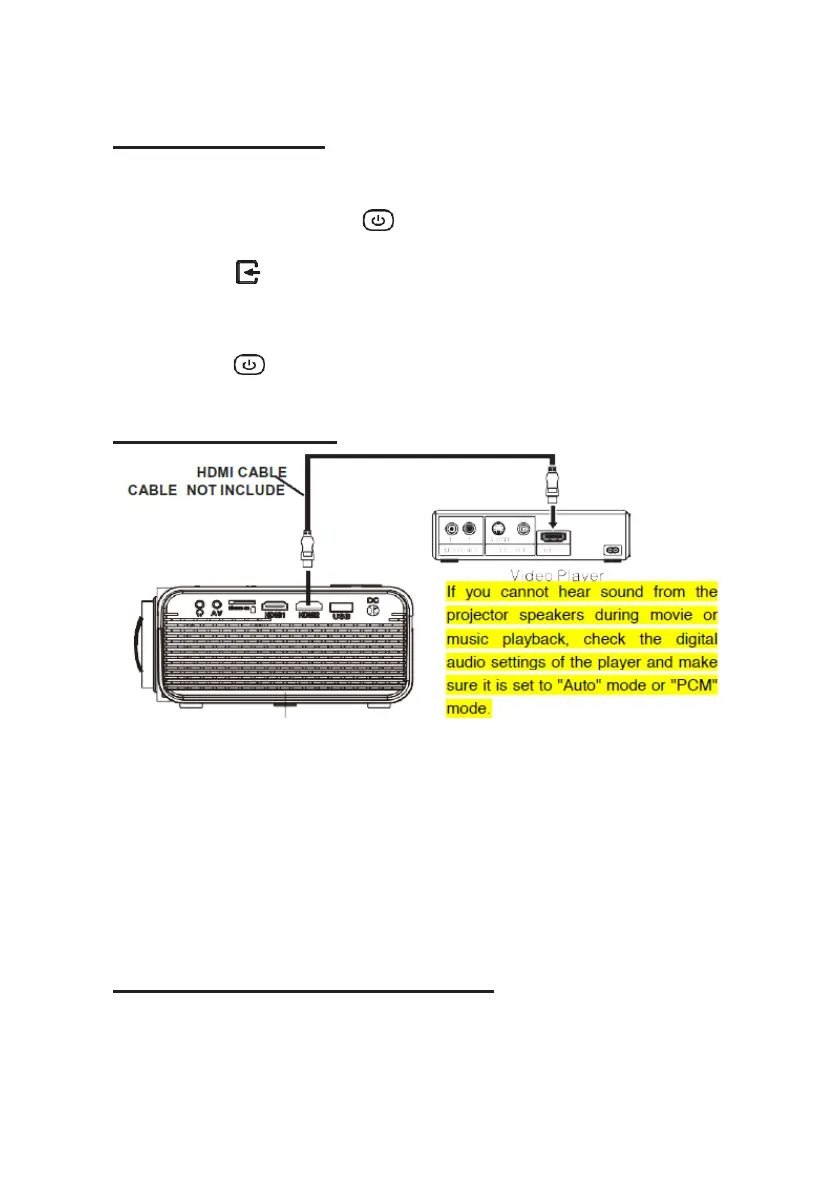
Follow the picture below to connect a device with an HDMI cable.
1.
Turn off the projector before connecting the HDMI cable.
2.
After connecting, press the button to turn on the projector and the
power indicator will light up GREEN
3.
Press the /SOURCE button to go to HDMI mode and the video of the
HDMI device will show on the projector screen. There are 2 HDMI inputs,
HDMI1 interface corresponds to HDMI 1 in SOURCE mode, and HDMI2
interface corresponds to HDMI 2 in SOURCE mode.
4.
Press the button to turn off the unit power.
HDMI HD signal input
- Using a MHL HDMI cable:
This projector is compatible with MHL cables: this means that you can
connect your smartphone or tablet (if MHL compatible) and stream in HD
from your smartphone or tablet to the projector with a MHL cable (not
included).
- Using a Chromecast dongle:
The HDMI connectors are compatible with the use of a chrome cast dongle
to enable you to stream wirelessly from your smartphone or tablet
Connecting an AV Source
Follow the picture below to connect a device with an AV cable.
1.
Turn off the unit before connecting the AV cable.
2.
Use the AV cable to connect a device as shown in the image below.


 To Next Page