7
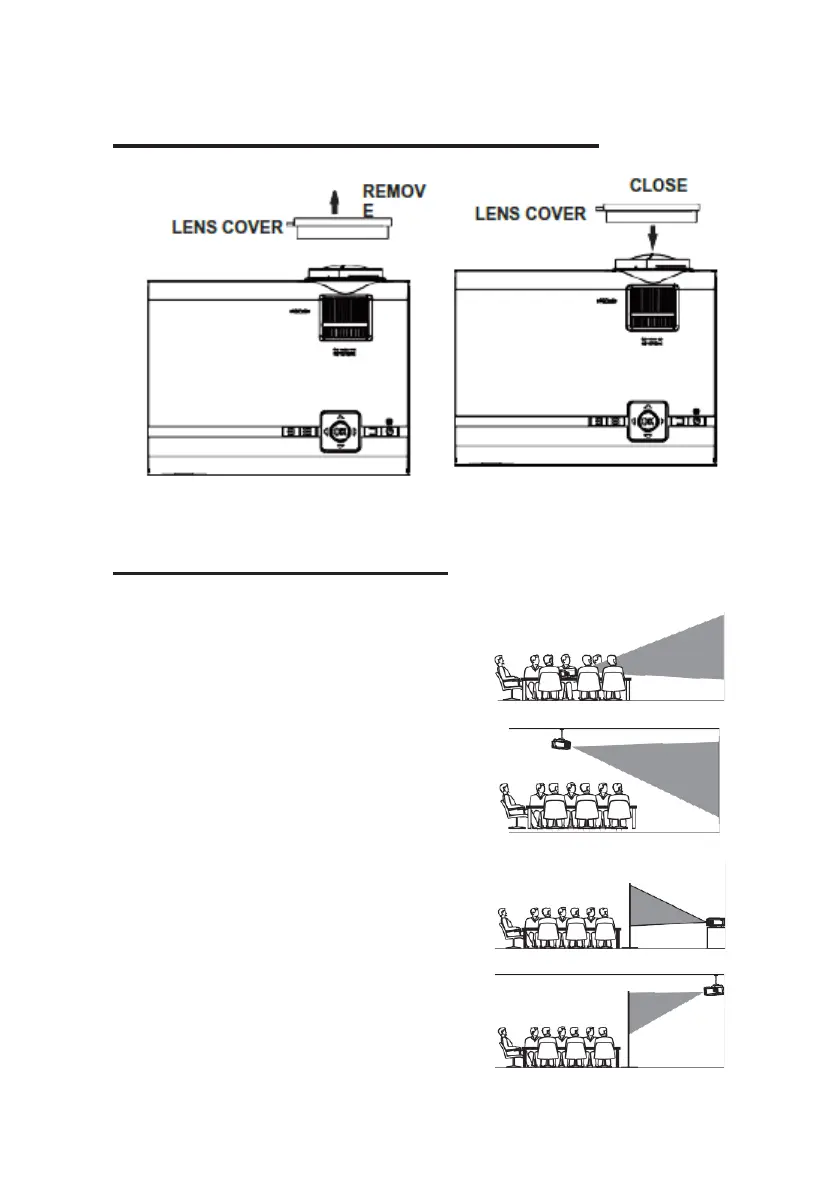
Remove & Close The Lens Cover
Remove the lens cover before using
Close the lens cover
after use.
Placing Your Projector
Your projector can be installed in four different configurations (see picture below):
Table mounting front:
Select this location with the projector is placed
in front of the screen. This is the most common
way to position the projector for quick setup
and portability.
Ceiling mounting front:
Select this location when the projector is mounted
upside down at the ceiling in front of the screen.
NOTE: A projector mount is required to mount
the projector on the ceiling.
Table mounting rear:
Select this location if you want to place the
projector at the rear of the screen.
NOTE: That a special rear projection screen is
required.
Ceiling mounting rear:
Select this location when the projector is
mounted upside down at the ceiling at the rear
of the screen.
NOTE: That a projector mount and a rear


 To Next Page