Stopping play
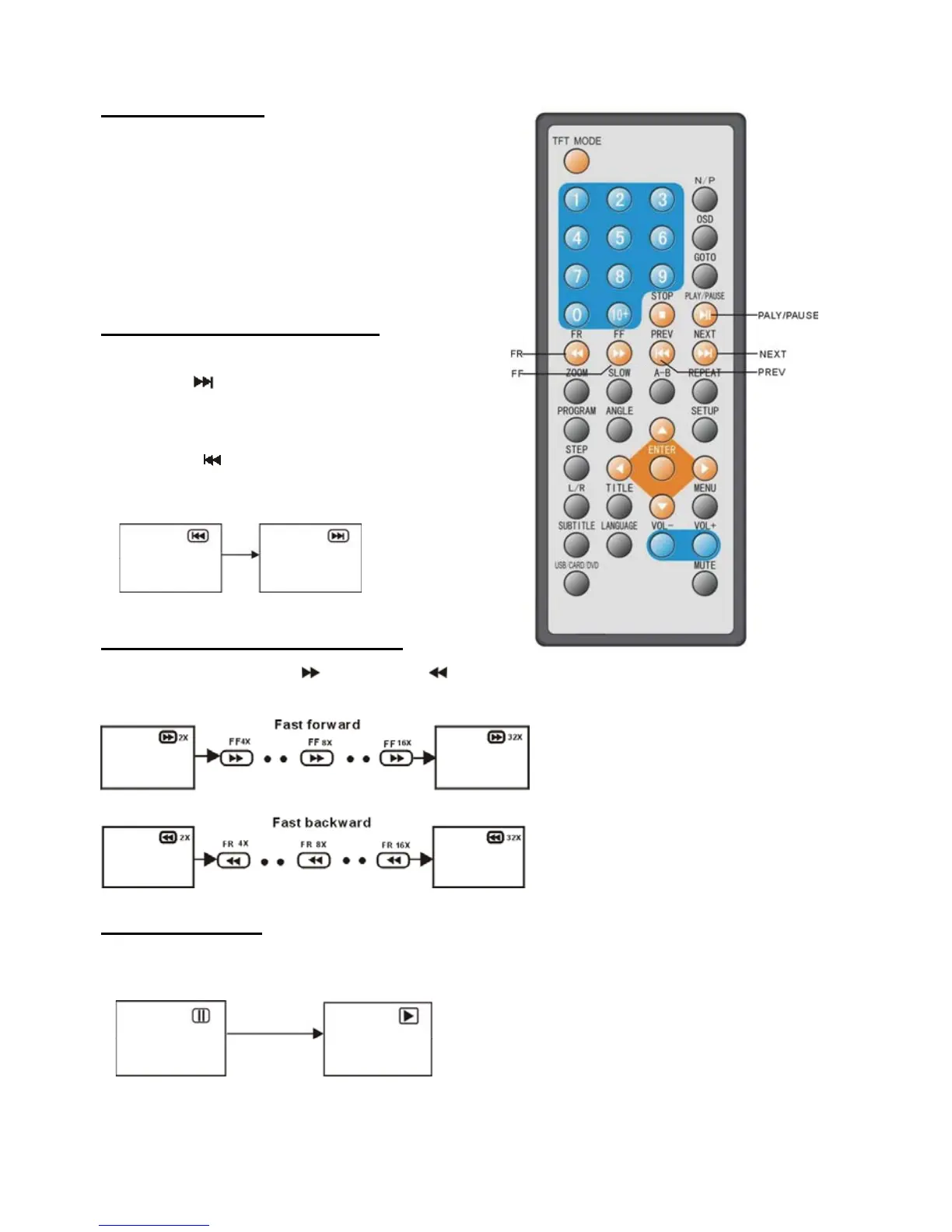
Press the STOP button to stop playing a disc.
NOTE: When player is stopped, the player
records the point where STOP was pressed
(RESUME function). Press the PLAY/PAUSE
button again, playback will resume from this
point . When the disc door is opened or the
STOP button is pressed again, the RESUME
function will be cleared.
Skipping ahead or back
Skipping ahead
Press NEXT
button during play
A chapter (DVD) or a track (Video CD/CD) is
skipped each time the button is pressed.
Skipping back
Press PREV
button during play
A chapter(DVD) or a track (Video CD/CD) is
skipped each time the button is pressed.
Fast forward or backward
During playback, press FF button or FR button to fast forward/rewind.
Press PLAY/PAUSE button to resume normal play.
Pause or play
During playback, press PLAY/PAUSE button, the play will be paused, To resume normal play,
press the PLAY/PAUSE button again.
14


 To Next Page