GB 4
TO SKIP TO THE BEGINNING OF A TRACK
• Play/back resumes from the selected track.
SEARCHING FOR A PASSAGE WITHIN A TRACK
TO STOP PLAYBACK
Press the STOP button.
For CD :
Total number of tracks and time will be shown.
For MP3/WMA/USB/SD/MMC :
Total number of tracks and folder
will be shown.
automatically.
In stop mode, press the Enter/Play/Pause
button to play the track.
For CD :
disc playback.
For MP3/WMA/USB/SD/MMC :
SD/MMC playback.
CD display
MP3 display
WMA display
USB display
SD/MMC display
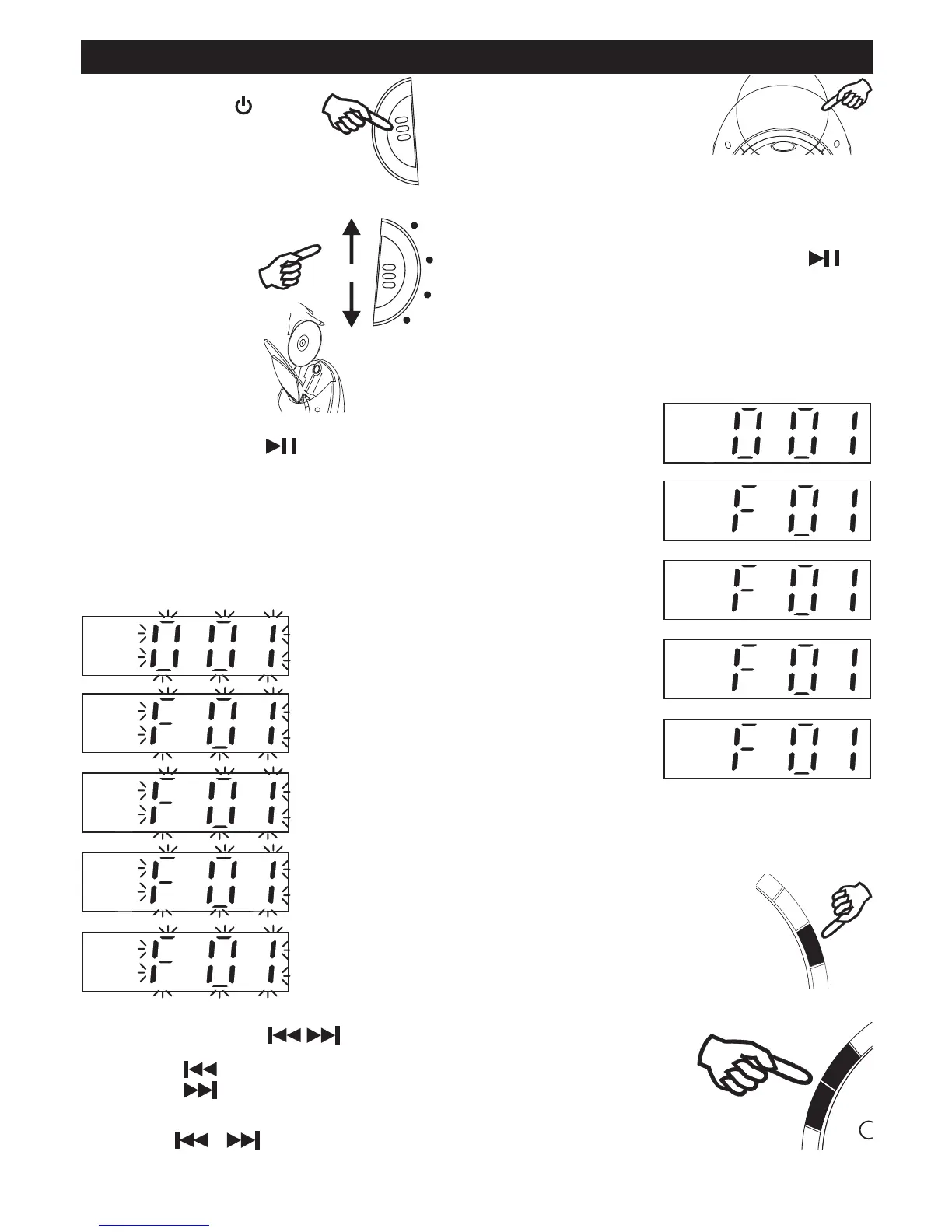
COMPACT DISC PLAYBACK
2. Slide FUNCTION button
to CD position.
Open / Close CD area.
4. Insert a disc with the label
5. Close the CD door,
the disc will rotate and total number of the folder will
show on the display.
For CD :
Track number "001" will be shown, the time of the track
For MP3/WMA/USB/SD/MMC :
Track number "F01" will be shown, the time of the track
MMC playback.
TO INTERRUPT PLAYBACK
Press the Enter/Play/Pause button. Press the button
to resume playback.
CD display
MP3 display
WMA display
USB display
SD/MMC display
1. Turn on the unit by
press STANDBY button.
FUNCTION
CD


 To Next Page