GB 1
USING HOUSE CURRENT
Beforeuse,checkthattheratedvoltage
ofyourunitmatchesyourlocalvoltage.
Note:Plugisusedasthedisconnectdevice.
Thedisconnectdeviceshallremainreadily
operable.
USING BATTERIES
Disconnect the AC power cord from the AC inlet of the
unit.Batterypoweriscutautomatically bythecordwhile
it is connected.
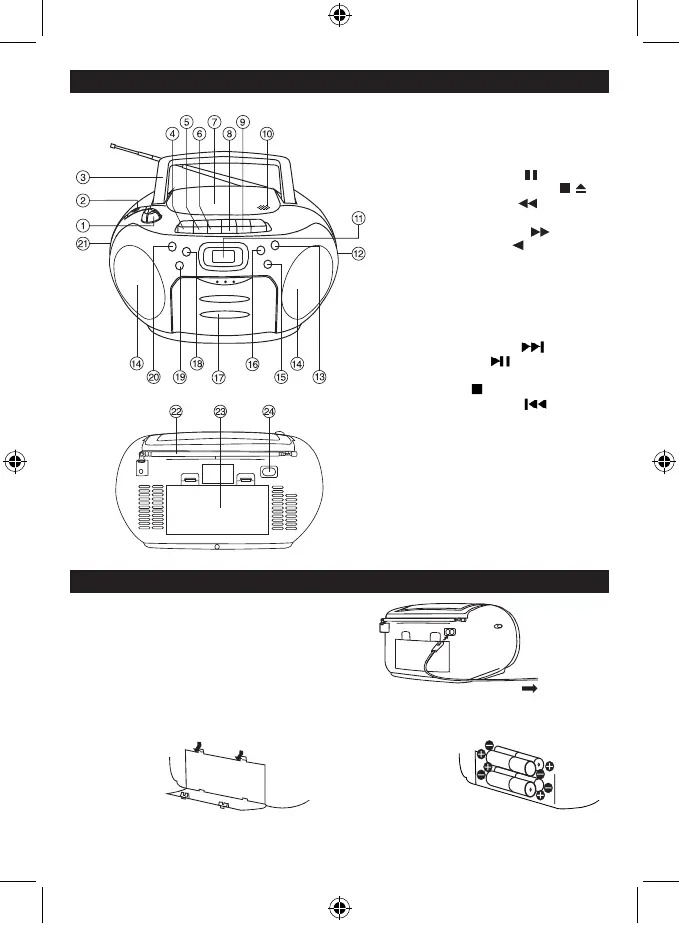
InserteightUM-2(sizeC)batteries.
batterydoor
When the volume decrease, or the sound distorts, replace
all of the batteries with new ones.
To AC socket
To AC outlet
POWER SUPPLY
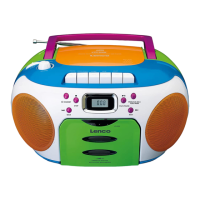
1. VOLUME CONTROL
2. FUNCTIONSWITCH
3. CARRYING HANDLE
4. CASSETTE PAUSE
5. CASSETTE STOP/EJECT
6. CASSETTE F.FWD
7. CD DOOR
8. CASSETTE REWIND
9. CASSETTE PLAY
10. OPEN / CLOSE CD DOOR AREA
11. LCD DISPLAY
12. TUNINGCONTROL
13. PROG/CLK-ADJ./PLAY MODE
BUTTON
14. SPEAKER
15. CD NEXT BUTTON
16. PLAY/PAUSE BUTTON
17. CASSETTE DOOR
18. CD STOP BUTTON
19. CD BACK BUTTON
20. STANDBYBUTTON
21. PHONESJACK
22. TELESCOPICANTENNA
23. BATTERYCOMPARTMENT
24. ACSOCKET
LOCATION OF CONTROLS
CD17CD-LENCO-SCD-971 ENG-TCD19A-no recording 250 MINS.indd 3 30/10/2018 15:44:01


 To Next Page