13
Stopping play
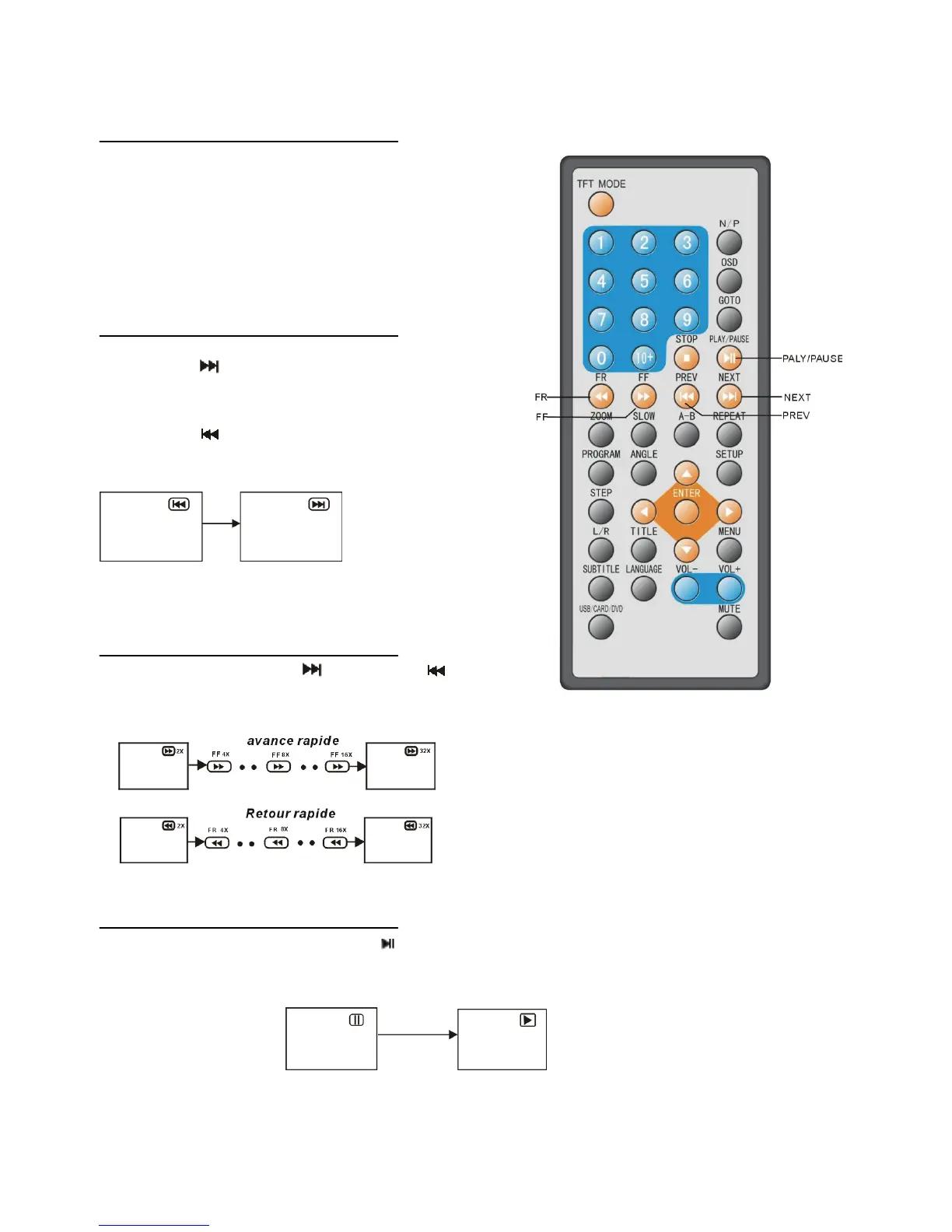
Press the STOP button to stop playing a disc.
NOTE: When player is stopped, the player
records the point where STOP was pressed
(RESUME function). Press PLAY again,
playback will resume from this point . When the
tray is Opened or STOP is pressed again, the
RESUME function will be cleared.
Skipping ahead or back
Skipping ahead
Press NEXT button during play
A chapter (DVD) or a track (Video CD/CD) is
skipped each time the button is pressed.
Skipping back
Press PREV button during play
A chapter(DVD) or a track (Video CD/CD) is
skipped each time the button is pressed.
Rapid advance (Rapid
Reverse)
During playback, press FF button or FR
button to fast forward/rewind. Press
PLAY button to resume normal play.
Pause or play
During playback, press PLAY/PAUSE button, the play will be paused, To resume normal play, press
PLAY button.


 To Next Page