Need help?
Do you have a question about the Lennox Carel pGD1 and is the answer not in the manual?
Covers the pGD1's purpose, common uses, and critical safety warnings for installation.
Details procedures for both handheld and wall mounting of the pGD1 interface.
Explains how to connect the pGD1 to the unit controller, including distance limits and port options.
Describes the pGD1's buttons and how to address it within the Carel controller.
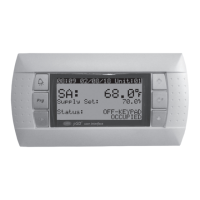
The Carel pGD1 Digital Display/Interface Module is a remote user interface designed for Carel controllers, specifically for use with Lennox "DLV" Packaged Ventilation/Dedicated Outside Air System (DOAS) Units. This module allows users to remotely access the Carel controller to make setpoint changes and monitor the operational status of the equipment.
The pGD1 serves as a remote interface, providing a convenient way to interact with the Carel controller without direct access to the unit-mounted controller. This is particularly useful for servicing units where the controller might be difficult to reach (e.g., due to unit size or roof curb height) or for maintenance personnel who prefer to monitor and adjust settings from a control room. The module features an LED backlit graphic display and six buttons for navigation and control, ensuring excellent visibility and ease of use. It also includes a buzzer to indicate alarm conditions, enhancing operational awareness. It's important to note that the pGD1 itself does not have temperature/humidity control capabilities; its primary role is to interface with the Carel controller's menu structure. For space temperature/humidity sensing and control, users should refer to the Carel pAD literature.
The pGD1 can be used in two primary ways: as a handheld device or wall-mounted.
For handheld use, an RJ12 cable (not exceeding 100 feet in length) is connected to the back of the pGD1. The other end of the cable connects to the unit-mounted controller. If the distance between the pGD1 and the Carel controller exceeds 100 feet, additional Carel literature should be consulted.
For wall mounting, the back of the interface module and the front trim plate are removed. The back of the module is then attached to a standard 2" x 4" electrical box mounted sideways using supplied round-head screws. An RJ12 cable (not exceeding 100 feet) is connected to the back of the pGD1. The pGD1 controller is then attached to the mounted back using flush-head screws, and the front trim plate is installed.
The pGD1 interface must be wired to the unit within 100 feet. If the distance exceeds 100 feet, refer to Carel literature. The wiring varies by unit model and configuration:
The pGD1 has six buttons for control:
Typically, the unit controller automatically recognizes the pGD1 when connected. If not, the address must be set manually:
The pGD1 simplifies maintenance by allowing technicians to access controller menus from a more convenient location, reducing the need for ladders or direct access to the unit-mounted controller, especially on large or roof-mounted units. The robust IP40 (NEMA Type 1) protection rating ensures durability in typical control room or indoor environments. The use of standard RJ12 cabling for connection also facilitates easy installation and replacement if needed.
 General
| Brand | Lennox |
|---|---|
| Model | Carel pGD1 |
| Category | Control Unit |
| Language | English |

 To Next Page