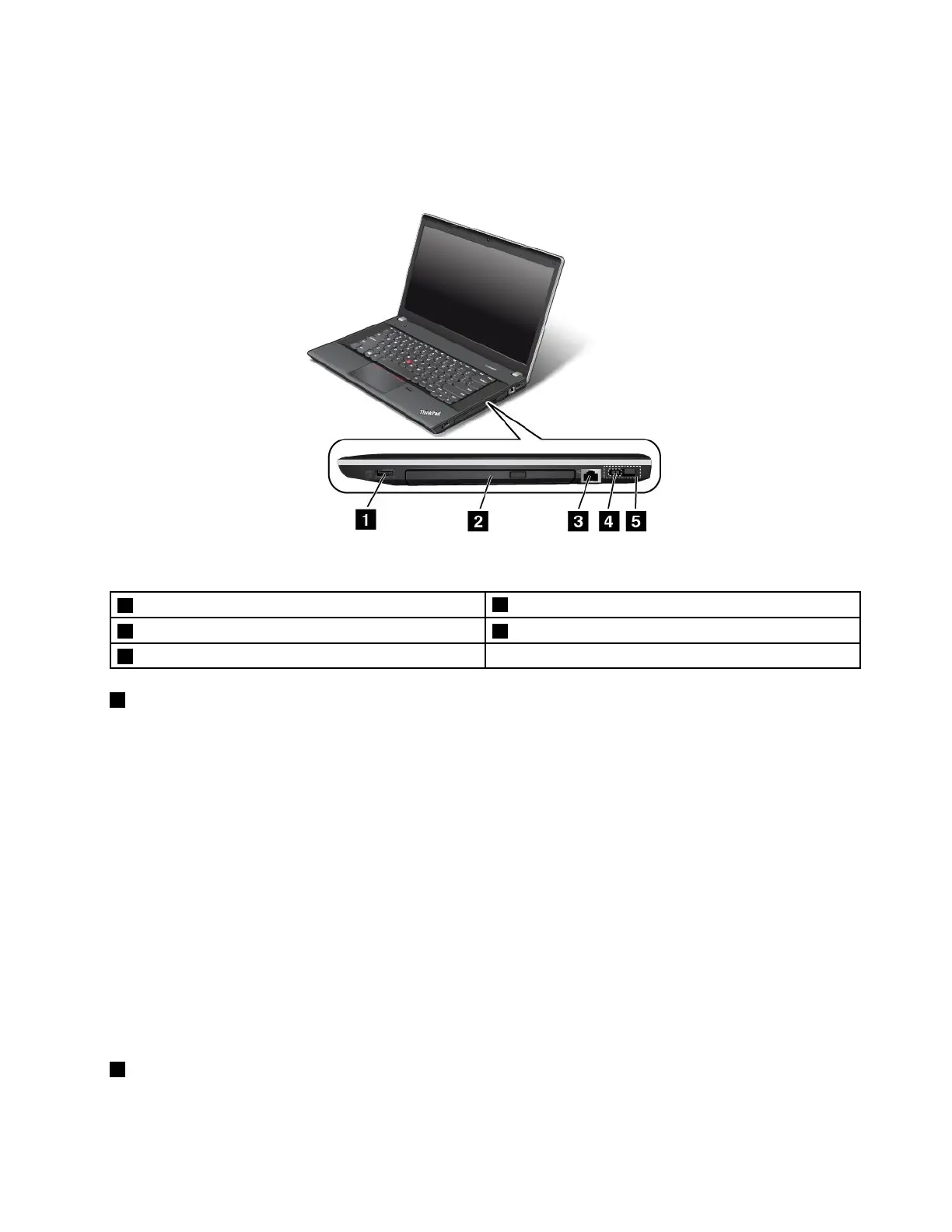
Right-sideview
Note:Yourcomputerkeyboardmightlookdifferentfromthefollowingillustration.
Figure3.ThinkPadEdgeE440andE540right-sideview
1AlwaysOnUSBconnector
4acpowerconnector
2Opticaldrive5LenovoOneLinkconnector
3Ethernetconnector
1AlwaysOnUSBconnector
Bydefault,theAlwaysOnUniversalSerialBus(USB)connectorenablesyoutochargesomemobiledigital
devicesandsmartphonesinthefollowingsituations:
•Whenyourcomputerisonorinsleepmode
•Whenyourcomputerisinhibernationmodeoristurnedoff,butconnectedtoacpower
Ifyouwanttochargethesedeviceswhenyourcomputerisinhibernationmodeoristurnedoff,andthe
computerisnotconnectedtoacpower,dothefollowing:
•ForWindows7:OpenthePowerManagerprogramandclickGlobalPowerSettingsorclickAdvanced
➙GlobalPowerSettings.ThenselecttheEnableUSBchargefromthecomputerbatteryevenwhen
thecomputerisoffcheckbox,andclickOKorApply.
•ForWindows8:PresstheWindowskeytogototheStartscreen.ClickLenovoSettings➙Power.Then
selecttheEnableUSBchargefromthecomputerbatteryevenwhenthecomputerisoffcheck
boxunderAlwaysonUSB.
Note:WhenyouattachaUSBcabletothisUSBconnector,ensurethattheUSBmarkisfacingupward.
Otherwisetheconnectormightbedamaged.
2Opticaldrive
Usetheopticaldrivetoreadorburnopticaldiscs.
Chapter1.Productoverview5








 To Next Page