
 Need help?
Do you have a question about the Lenovo ThinkPad X41 and is the answer not in the manual?
Crucial information for servicing, including BIOS/driver fixes and customer support contacts.
Warning about loose parts causing electrical shorts after FRU replacement.
DANGER warning about standby batteries containing nickel and cadmium.
DANGER warning about battery packs containing nickel.
DANGER warning about lithium batteries causing fire, explosion, or burns.
Safety warning regarding LCD fluid exposure and handling.
DANGER warning about touching the inverter card's lower part.
DANGER warning about battery short circuits causing burns or fires.
General rules for ensuring safety during maintenance and handling heavy objects.
Rules and precautions for working with electrical equipment.
Lists numeric error codes and their corresponding FRU or action.
Lists beep codes and their potential causes or solutions.
Step-by-step instructions for removing and replacing the battery pack.
Detailed instructions for removing and replacing the hard disk drive.
Step-by-step guide for removing and replacing the keyboard.
Detailed steps for removing and replacing the entire LCD assembly.
Step-by-step instructions for removing and replacing the system board.
Detailed instructions for removing and replacing the LCD panel itself.
 General
| Bundled software | Access program, ThinkVantage Access Connections, Norton AntiVirus 2004 with 90 days of virus definition upgrades, PC Doctor diagnostics, ThinkVantage Rescue and Recovery, Adobe Acrobat Reader |
|---|---|
| Operating system installed | Windows XP Professional |
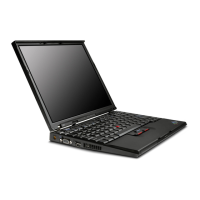
| Display diagonal | 12.1 \ |
| Display resolution | 1024 x 768 pixels |
| Native aspect ratio | 4:3 |
| HDD speed | 4200 RPM |
| Optical drive type | No |
| Total storage capacity | 40 GB |
| Compatible memory cards | SD |
| Processor frequency | 1.6 GHz |
| Processor manufacturer | Intel |
| Processor front side bus | 400 MHz |
| Internal memory | 0.5 GB |
| Internal memory type | DDR2-SDRAM |
| Discrete graphics card | Yes |
| Discrete graphics card model | Intel® GMA 900 |
| Maximum graphics card memory | 0.128 GB |
| Modem speed | 56 Kbit/s |
| Dimensions (WxDxH) | 268 x 211 x 21 mm |
| Charging port type | DC-in jack |
| Modem (RJ-11) ports | 1 |
| USB 2.0 ports quantity | 2 |
| Parallel ports quantity | 0 |
| CardBus PCMCIA slot type | Type II |
| Audio system | SoundMAX |
| Keyboard type | Full size |
| Pointing device | Trackpad |
| Networking features | Ethernet/Fast Ethernet/Gigabit Ethernet/IEEE 802.11a/IEEE 802.11b/IEEE 802.11g/Bluetooth |
| Battery life (max) | 2.5 h |
| Number of battery cells | 4 |
| Storage drive type | ATA-100 (Enhanced IDE) |
| Cable lock slot type | IBM |
 Weight and Dimensions
| Depth | 211 mm |
|---|---|
| Width | 268 mm |
| Height | 21 mm |
| Weight | 1290 g |




 To Next Page