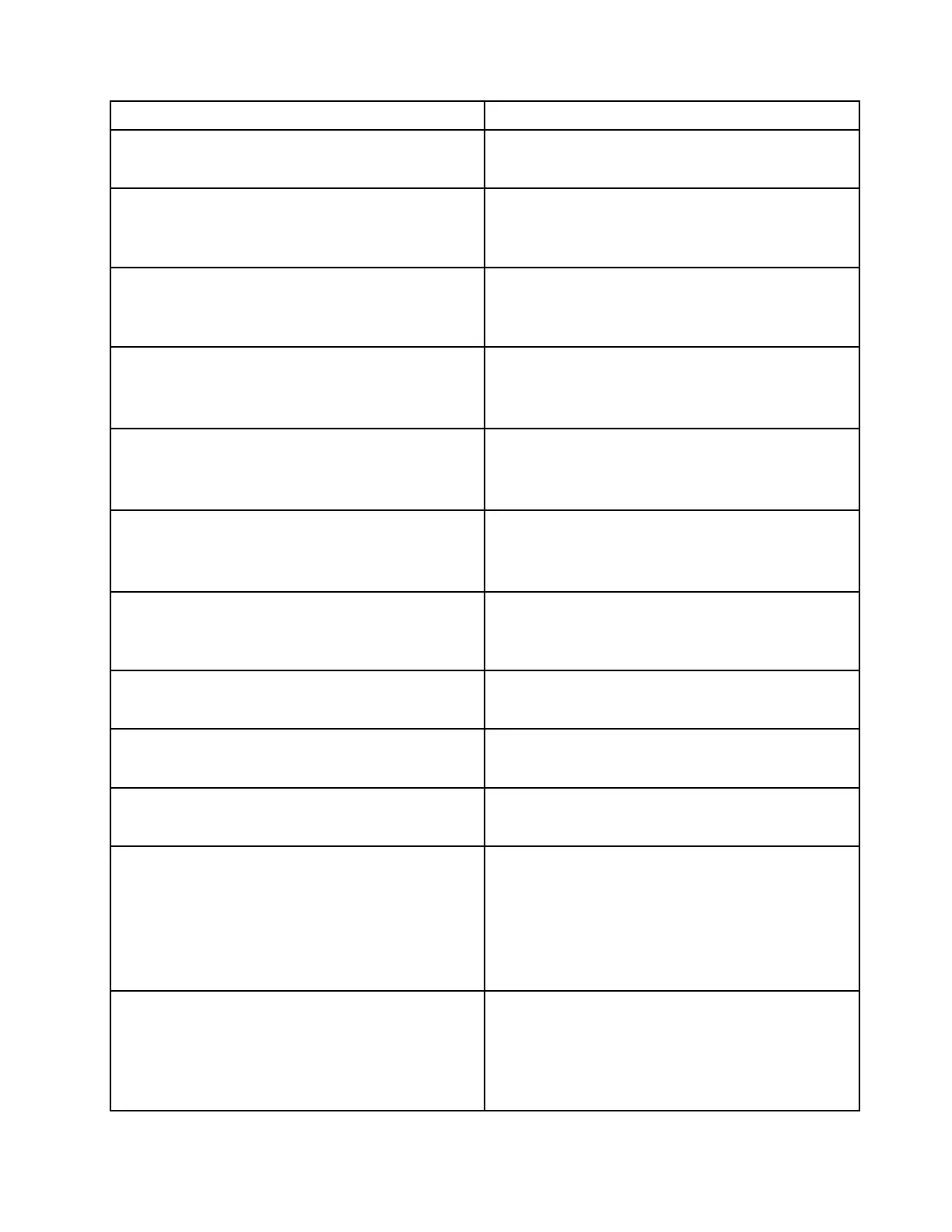
Message/Symptom
FRU/Action
Dead Hub.
1. Power Supply
2. System Board
Diskette drive in-use light remains on or does not light
when drive is active.
1. Diskette Drive
2. System Board
3. Diskette Drive Cable
Blank screen except for flashing cursor.
1. System Board
2. Primary Hard Disk Drive
3. Hard Disk Drive Cable
Incorrect memory size during POST
1. Run the Memory tests.
2. Memory Module
3. System Board
"Insert a Diskette" icon appears with a known-good
diagnostics diskette in the first 3.5-inch diskette drive.
1. System Board
2. Diskette Drive Cable
3. Network Adapter
Intensity or color varies from left to right of characters and
color bars
1. Display
2. Video adapter (if present)
3. System Board
Non-system disk or disk error-type message with a
known-good diagnostic diskette.
1. Diskette Drive
2. System Board
3. Diskette Drive Cable
Other display symptoms not listed above (including blank
or illegible display)
1. Display
2. System Board
Power-on indicator or hard disk drive in-use light not on,
but hub works correctly
1. Power switch/LED assembly
2. System Board
Printer problems
1. Printer
2. System Board
Program loads from the hard disk with a known-good
diagnostics diskette in the first 3.5-inch diskette drive
1. Run the Setup Utility program and check the Startup
sequence.
2. Diskette Drive
3. Diskette Drive Cable
4. System Board
5. Power Supply
RPL hub cannot access programs from its own hard disk.
1. If the network administrator is using LCCM Hybrid
RPL, check the startup sequence:
a. First device - network
b. Second device - hard disk
2. Hard disk drive
Chapter 4. Service checkout and symptom-to-FRU index 35




 To Next Page