This document describes ThinkVision monitors, focusing on their features, specifications, and how they integrate into business environments. ThinkVision monitors are designed to enhance productivity and provide a better work experience, offering a range of choices from essential models for general business needs to performance models with advanced ergonomic and usability features.
Function Description:
ThinkVision monitors serve as the visual interface for computing systems, compatible with both ThinkPad notebooks and ThinkCentre desktops. They are designed to display information clearly and efficiently, supporting various applications from basic word processing to professional graphics and complex data analysis. The monitors facilitate multi-monitoring setups, allowing users to extend their workspace and view more information simultaneously, which can improve productivity and reduce errors. For ThinkPad users, additional monitors can be easily connected via the integrated VGA port or an optional ThinkPad Dock, Mini-Dock, or Port Replicator, with configuration simplified by the Presentation Director utility.
Important Technical Specifications:
CRT Monitors (E54, E74, C170, C190):
- Monitor Size/Viewable Image Size: Ranging from 15" (381mm)/13.8" (350mm) for the E54 to 19" (483mm)/18.0" (457mm) for the C190.
- Monitor Type: Shadow Mask (E54, E74) or Full Flat Shadow Mask (C170, C190).
- Maximum Display Mode: Up to 1600x1200@75Hz (C190).
- Horizontal Dot/Pitch: Ranging from 0.24mm (E54) to 0.22mm (C170, C190).
- Vertical/Horizontal Frequency Range: Up to 50-160Hz/30-96KHz (C190).
- Maximum Pixel Frequency: Up to 202MHz (C190).
- Power Consumption: Ranging from 70W (typical) for the C170 to 100W (typical) for the C190.
- Dimensions (HxWxD): For C190, 468x456x458mm (18.4x18.0x18.0").
- Weight: For C190, 21.3kg (46.8 lb).
- Compliance: TCO-99, MPR-II compliant, VESA DDC Plug and Play enabled, VESA power management.
- OSD: Available with 5 or 6 languages.
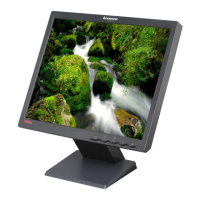
Flat Panel Monitors (L151, L151p, L171, L170m, L171p, L190, L191p, L200p):
- Display Type: Active Matrix Thin Film Transistor (TFT) Liquid Crystal Display (LCD).
- Monitor Size: Ranging from 15.0" (381mm) for L151/L151p to 20.1" (511mm) for L200p.
- Brightness (typical): Ranging from 250 cd/m³ to 300 cd/m³.
- Contrast Ratio (typical): Ranging from 400:1 to 1000:1 (L191p).
- Viewing Angle (vertical/horizontal): Up to 178°/178° (L191p, L200p).
- Response Time (typical): Ranging from 8ms (L171, L171p) to 25ms (L200p).
- Native Resolution: Ranging from 1024x768 (L151, L151p) to 1600x1200 (L200p).
- Video Input: Analog (all Essential models) or Analog/Digital (Performance models with 15-pin D and DVI-D/DVI-I).
- Power Consumption: Ranging from 30W (typical) for L151/L151p to 65W (typical) for L200p.
- Dimensions (HxWxD): For L200p, 470x468x252mm (18.5x18.4x9.9") max lift.
- Weight: For L200p, 9.5kg (20.9 lb).
- Compliance: ISO 13406-2 capable, TCO-99, ENERGY STAR, VESA power management.
- OSD: Available with 5 or 6 languages.
Usage Features:
- Ergonomic Stands: Select models (e.g., "p" series performance models) feature cantilevered stands that allow for swivel, tilt, and height adjustments, providing optimal viewing comfort. These stands can pivot for portrait mode viewing (graphic card-dependent).
- Dual Inputs: Performance models offer both digital and analog inputs (15-pin D and DVI-D/DVI-I) for flexibility and investment protection, allowing connection to two systems.
- Wide Viewing Angles: Up to 178° and super-high contrast ratios enhance usability, making content visible from various positions.
- Easy Access Controls: Buttons for common monitor adjustments and an intuitive onscreen display (OSD) simplify settings control.
- Multimedia Options: Some models offer optional ThinkVision USB Soundbars (L151, L151p, L171, L171p), while the L170m includes integrated speakers.
- Space and Power Savings: Flat panel monitors consume less power and take up less space compared to comparable CRT monitors.
- Extensive Compatibility Testing: Ensures seamless integration with ThinkPad and ThinkCentre systems.
- Security: Kensington Lock Slots are available on flat panel models for physical security.
Maintenance Features:
- Limited Warranty: ThinkVision monitors are backed by a three-year limited warranty, which includes the backlight. This warranty reflects a commitment to quality and includes an express-delivery replacement policy for failures during the warranty period, with shipping costs covered both ways for repairs.
- Component Quality: Monitors are built to exacting component-quality standards, ensuring reliability and longevity.
- Environmental Standards: Compliance with TCO-99, MPR-II, ISO 9241-3/7/8, and ENERGY STAR guidelines indicates adherence to environmental and safety standards.
- Operating and Storage Environments: Specified temperature and humidity ranges for both operation and storage ensure durability under various conditions.

 Need help?




 To Next Page

 General