PLAYING A CD
1
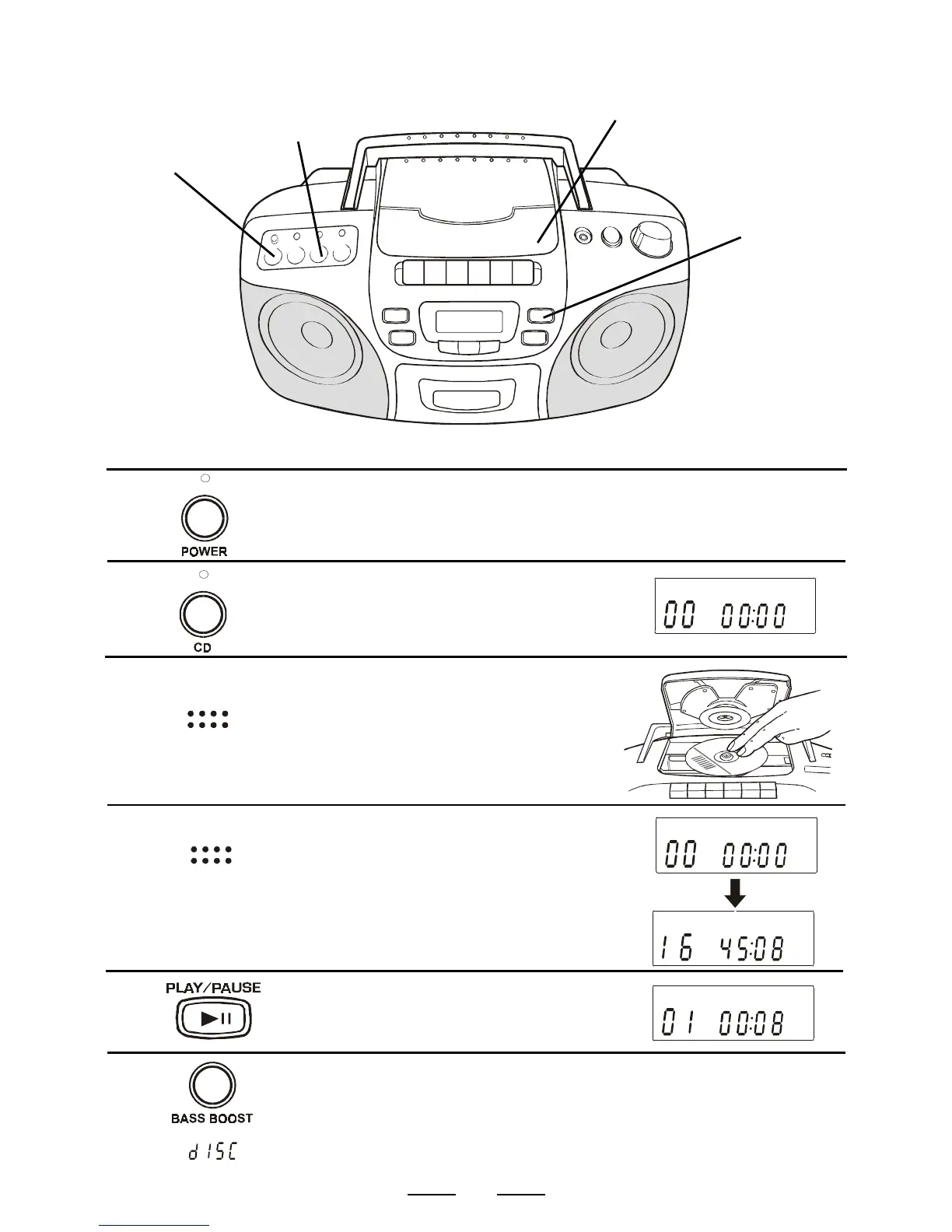
Press the POWER switch, the
POWER indicator lamp will go on.
4
1
3
Open the CD DOOR by pushing
it down at the position marked
OPEN/CLOSE and place the CD
in the CD compartment.
The label side of the CD should
face upward.
2
4
8
Connect the supplied AC power cord or batteries (see page 4).
3
Press the CD switch, the CD
indicator lamp will go on and the
display will show 6 zeros.
2
Close the CD DOOR by pushing it
down at the position marked
OPEN/CLOSE again. The display
will show 6 zeros and then the total
number of tracks (songs) and the
total playing time of the disc.
5
Press the CD PLAY button. The
player will play all the songs
(tracks) once.
TRACK
TRACK
TRACK
TRACK
OPEN
CLOSE
OPEN
CLOSE
TIP: WILL FLASH IN THE DISPLAY IF THERE IS NO DISC IN THE CD
COMPARTMENT OR THE DISC IS UPSIDE DOWN.
6
To hear more BASS sounds, press
the BASS BOOST button.



 To Next Page