Operation
Communicating via the CAN gateway function
Establishing communication using the system bus configurator
8
71
LDCDS−EL100 EN 8.0
Activating and diagnosing communication
Note!
Communication via the Global Drive Control (GDC) or the L−force Engineer only
works if the EL1xx has been defined as the standard device.
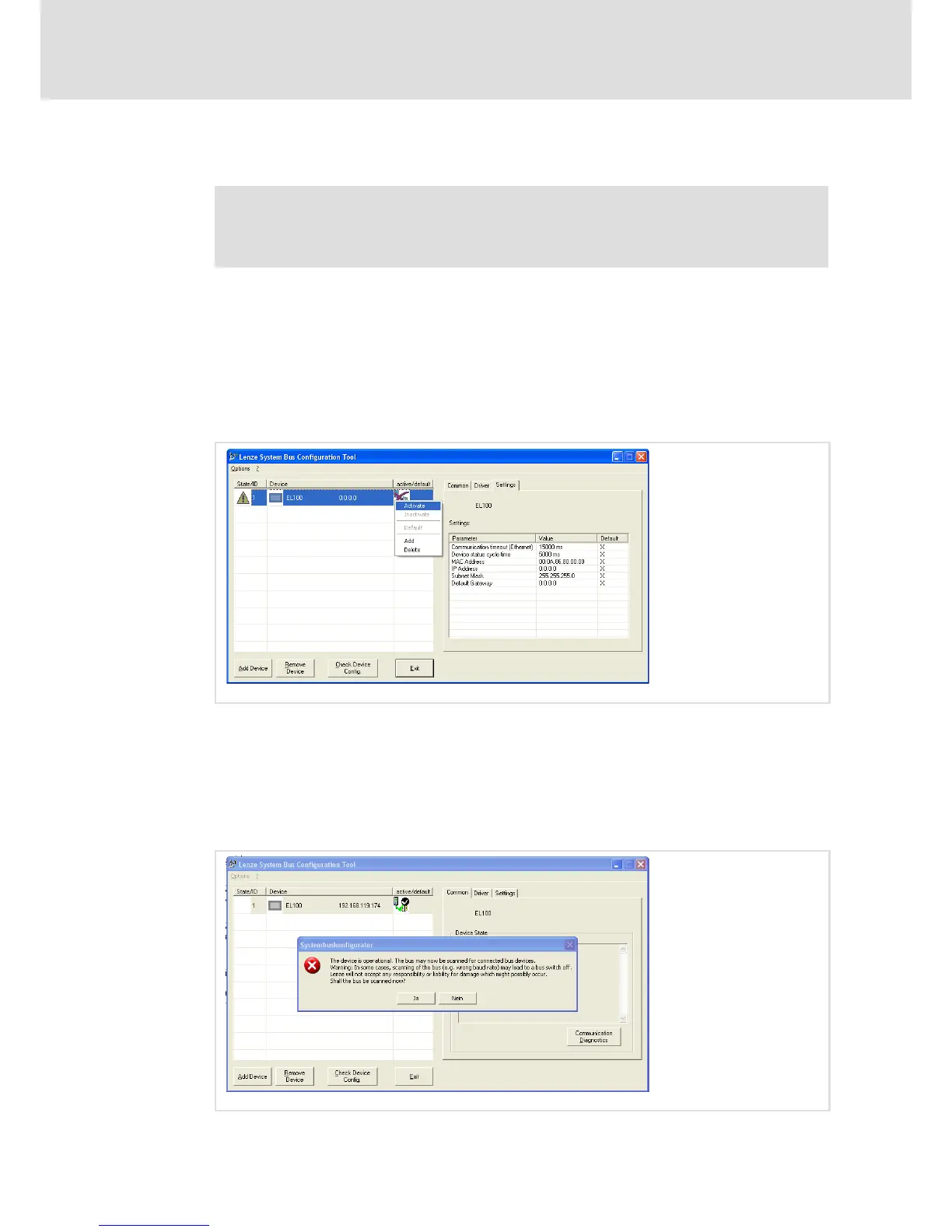
5. Right−click the communication module and select Activate from the context menu
to activate communication.
An activated device is indicated by a red check mark in the "active/default" column.
6. Define the EL1xx communication module as the standard device by another
right−click on the communication module in the system bus configurator and
selecting Default from the context menu.
The standard device is indicated by a black check mark in the "active/default" column.
EL100−038
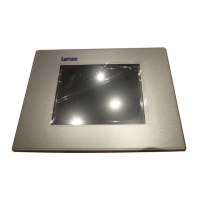
7. Select the new module in the system bus configurator.
8. For communication diagnostics, open the "Common" tab and click the
Communication diagnostics button.
A message is displayed. Please observe the note contained therein saying that wrong
settings may lead to a bus switch−off and that Lenze will not accept any responsibility
or liability for damage which might possibly occur.
EL100−039



 To Next Page