Operation
Controls and displays
Panel PC EL 5870
7
46
BA_ELx8xx EN 3.0
7.2.4 Panel PC EL 5870
5
5
"
(
§
&
)
=
/
$
!
>
/
*
-
+
,
|
546
879
123
<
0
-
+
Alt Strg
*
+
T
F4
€
D
EWQ
XY
SA
@
F3F1 F2
R
VC
F
F5
GH J
-
_
Ä
F9F8F6 F7 F10
OIPÜUZ
Ö
;
,
:
M
μ
.
LK
NB
Space
Enter
\
?
ß
~
F12
Esc
F11
Pos 1
Einfg
Ende
Entf
Bs
Alt Gr
Fail
Status
Power
Bild
Bild
5
5
2
1
0
3
4
ELx7xx009
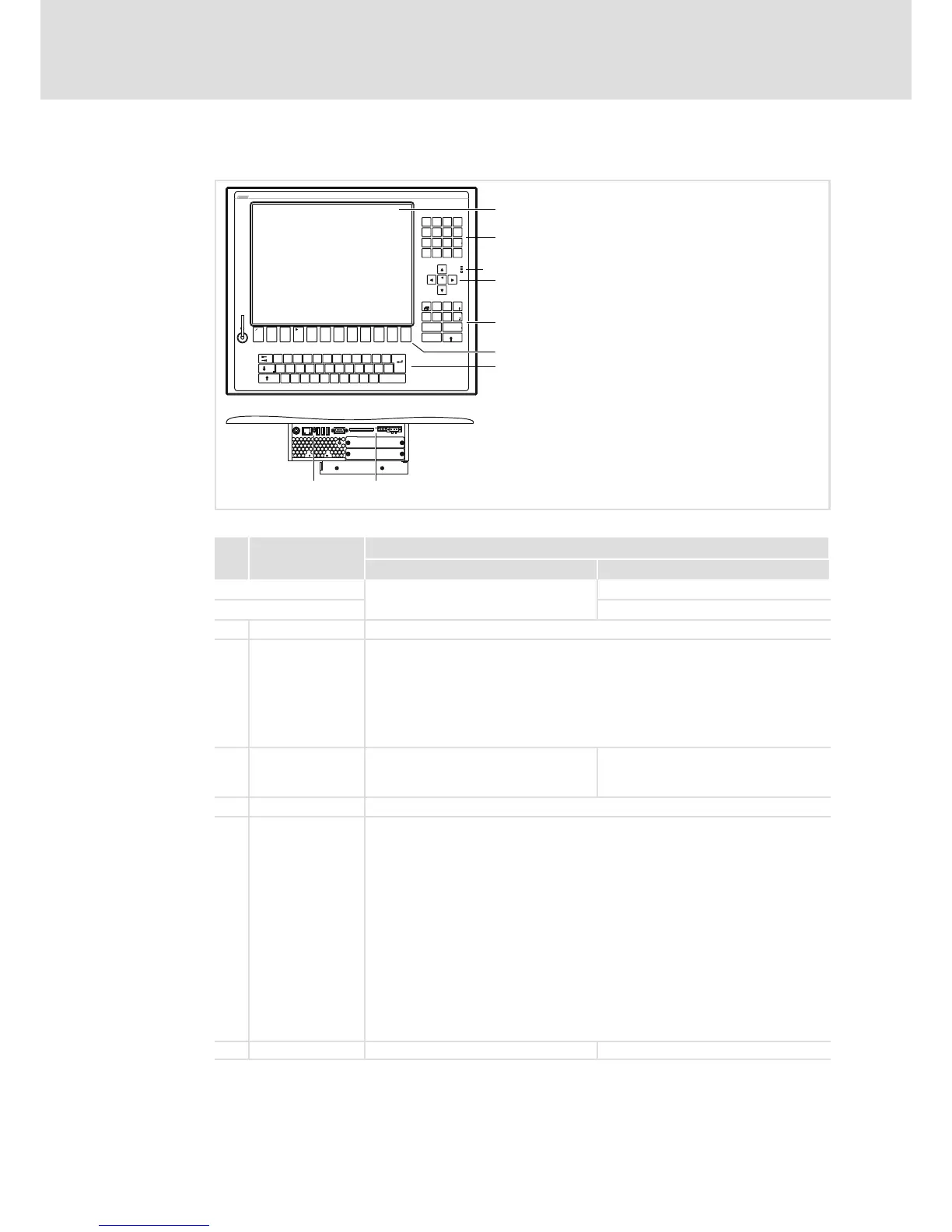
Pos. Designation
Function
Standard mode Service mode
Switch on mode: Press " (F4)" for 4 s
Switch off mode: Press " (F4)" or wait for 35 s
Display Application−dependent
Status LEDs Power (green):
l Is ON when the supply voltage is present.
Fail (red):
l Is ON when a power supply failure has occurred.
l Is blinking when the screen signal is missing.
Status (yellow):
l Indicates access to a storage medium.
Function keys F1 ... F12: Send key code for Shift−F1 ...
Shift−F12
Tool: Application−dependent
+: Increase screen brightness
−: Reduce screen brightness
Reset button Reset PC (restart)
Status LEDs Error (red):
l Is lit if a power supply failure has occurred;
l Is blinking when the screen signal is missing.
HD (yellow):
l Indicates access to a storage medium.
Power (green):
l Is lit when the supply voltage is present.
l Flashes (
−−−
−
−−−
−
) in the case of a hardware error.
l Is blinking (
−−
−
−−
−
) when the ACU UPS (optional) is being charged.
l Is blinking (
−−
−−
−−
−−
) when there is a supply voltage failure and the device is being
supplied by the ACU UPS.
l Is blinking (
−
−
−
−
) when the supply voltage of the ACU UPS is too low (e.g.
rechargeable battery is empty or missing).
l Blinks 4 x per second if the ACCU−PACK causes a short circuit or if the CAPS−PACK
is completely discharged.
MF2 keys Standard function of a MF2 keyboard



 To Next Page