www.lerdge.com
7
9. Level the print platform
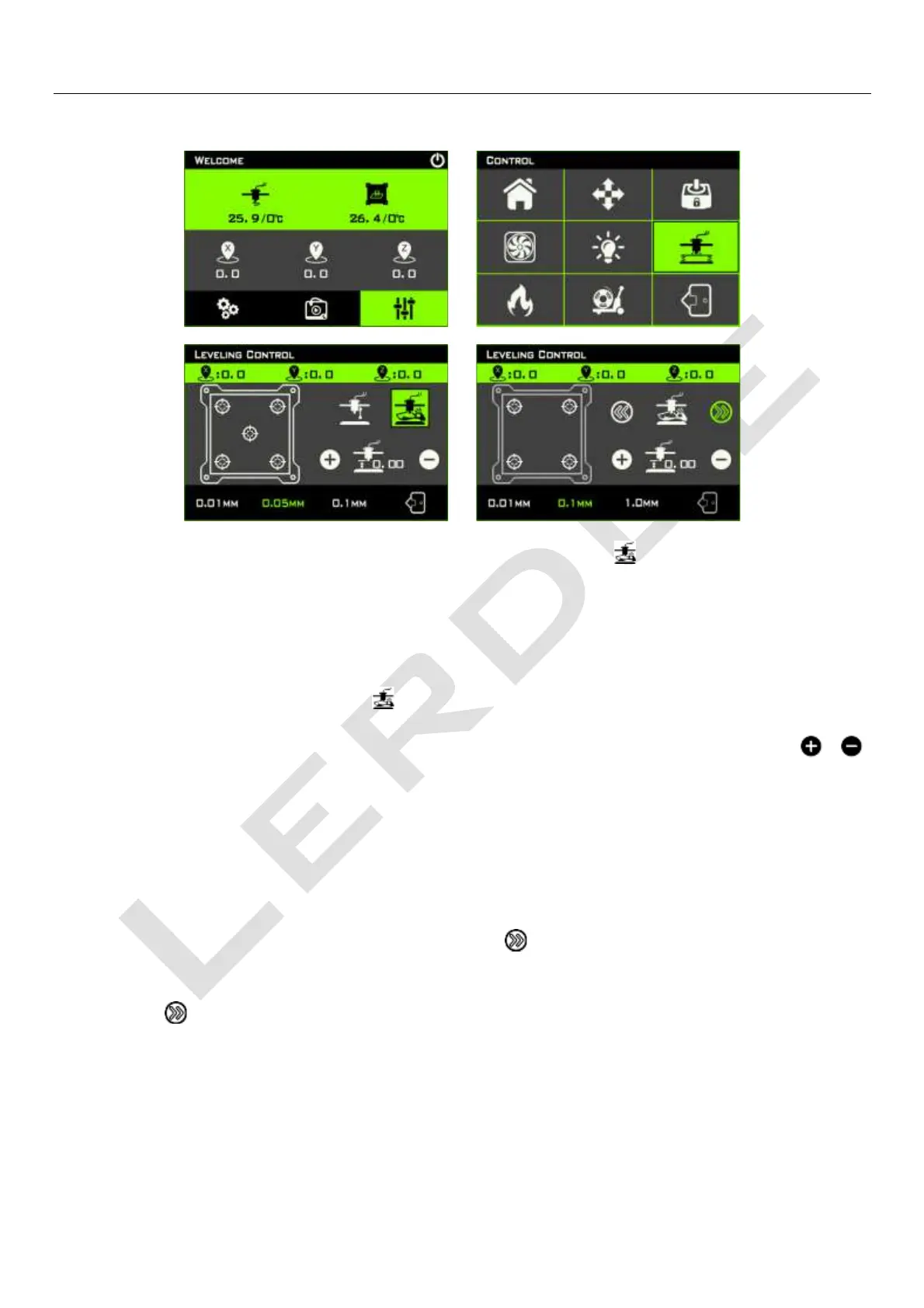
Enter the leveling control interface, click the manual leveling icon " ", (please be careful not to
click wrong! The left of the icon is automatic leveling icon. Currently Lerdge-iX is not equipped with
an automatic leveling probe. If you click the automatic leveling icon, the print head will hit the
platform!)
After clicking the manual leveling icon" ", Lerdge-iX will first perform the homing of each axis, and
then the print head will move to the position of the first point. At this time, by clicking the “ ” “ ”
icon, the distance between the nozzle and the platform can be adjusted. You can modify the unit
distance that the print head moves through the three values displayed at the bottom of the screen.
Adjust until the nozzle just touches the printing platform. It is recommended to judge the adjustment
effect by observing the gap between the nozzle and the platform. It is strongly not recommended to
use the method to feel the A4 paper being clamped.
When you finish the adjustment of one point, click the “ ” icon to continue to adjust the next point
until all the adjustment points are completed. Note: After the all leveling point is completed, be sure
to click the “ ” icon to end, so that the automatic leveling data can be saved!



 To Next Page