KVM-0850/1650 IP KVM switch
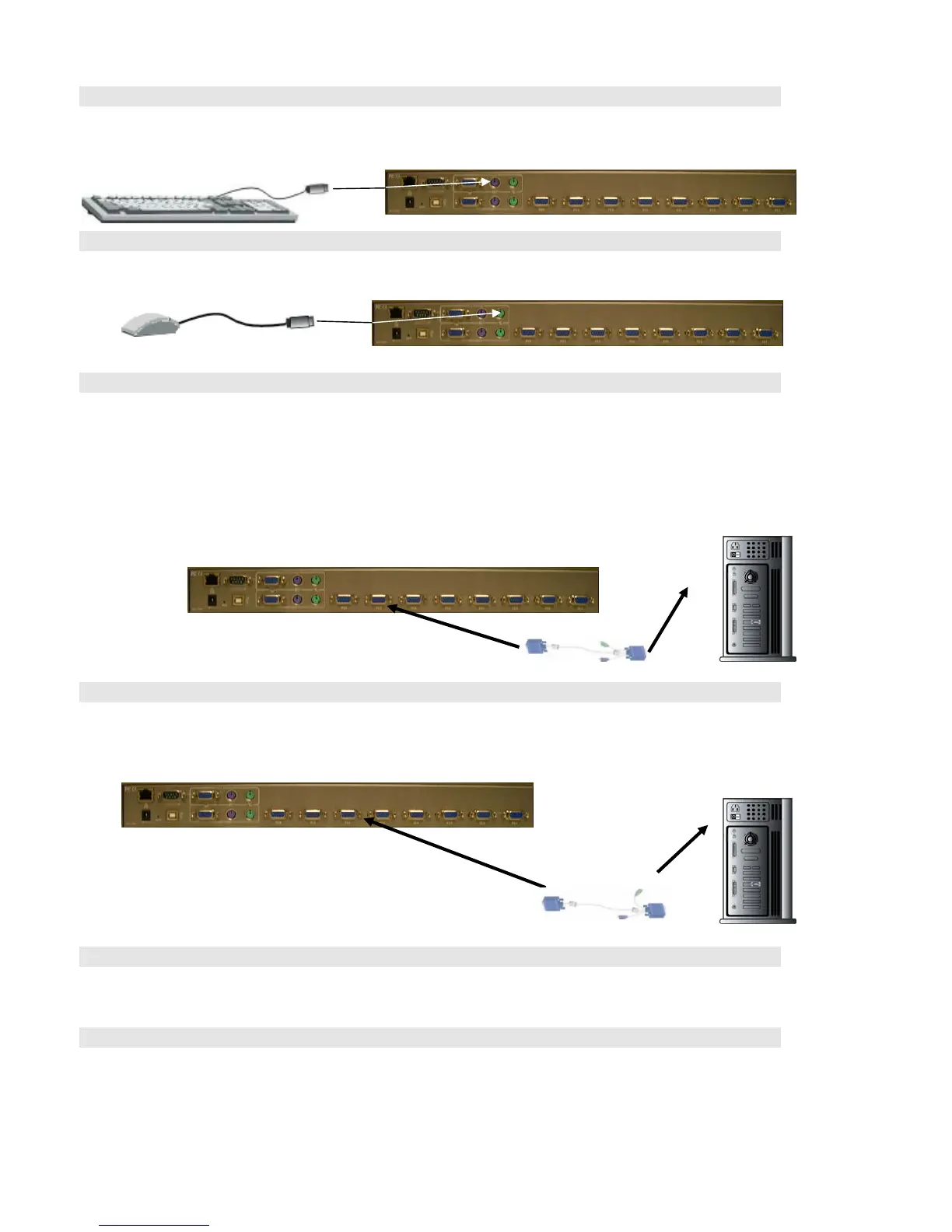
Step 3
Connect the keyboard to the KVM Switch. If you have an AT type keyboard, you will need an AT to
PS/2 adapter.
Step 4
Connect the mouse to the KVM Switch.
Step 5
Each PC port connector is HDDB15-pin type. Locate your input cable. It will have an HDDB15-pin
male connector at one end. Plug it into any label computer port on the rear of KVM switch unit. The
other end of input cable will have three connectors: a HDDB15-pin male type for PC video, a Mini Din
6 pin female type for keyboard and a Mini Din 6 pin female type for mouse. To plug these three
connectors into the respective ports of computer. Repeat the same procedure to all of PCs.
Step 6 (Optional)
If using a serial mouse cable (optional), connect one end to a DB-9 serial port on the computer, and
the other Mini Din 6 pin end to the mouse cable connector. If you need Serial DB-9 to PS/2 Mini Din 6
pin adapter, please contact your supplier.
The Rear Side of PC
Step 7
Double-check all of the connections. You can check the color of keyboard and mouse connector to
make sure the keyboard and mouse cables go to the correct ports.
Step 8
Repeat step 5 to 7 for the remainder of the computers.
13












 To Next Page