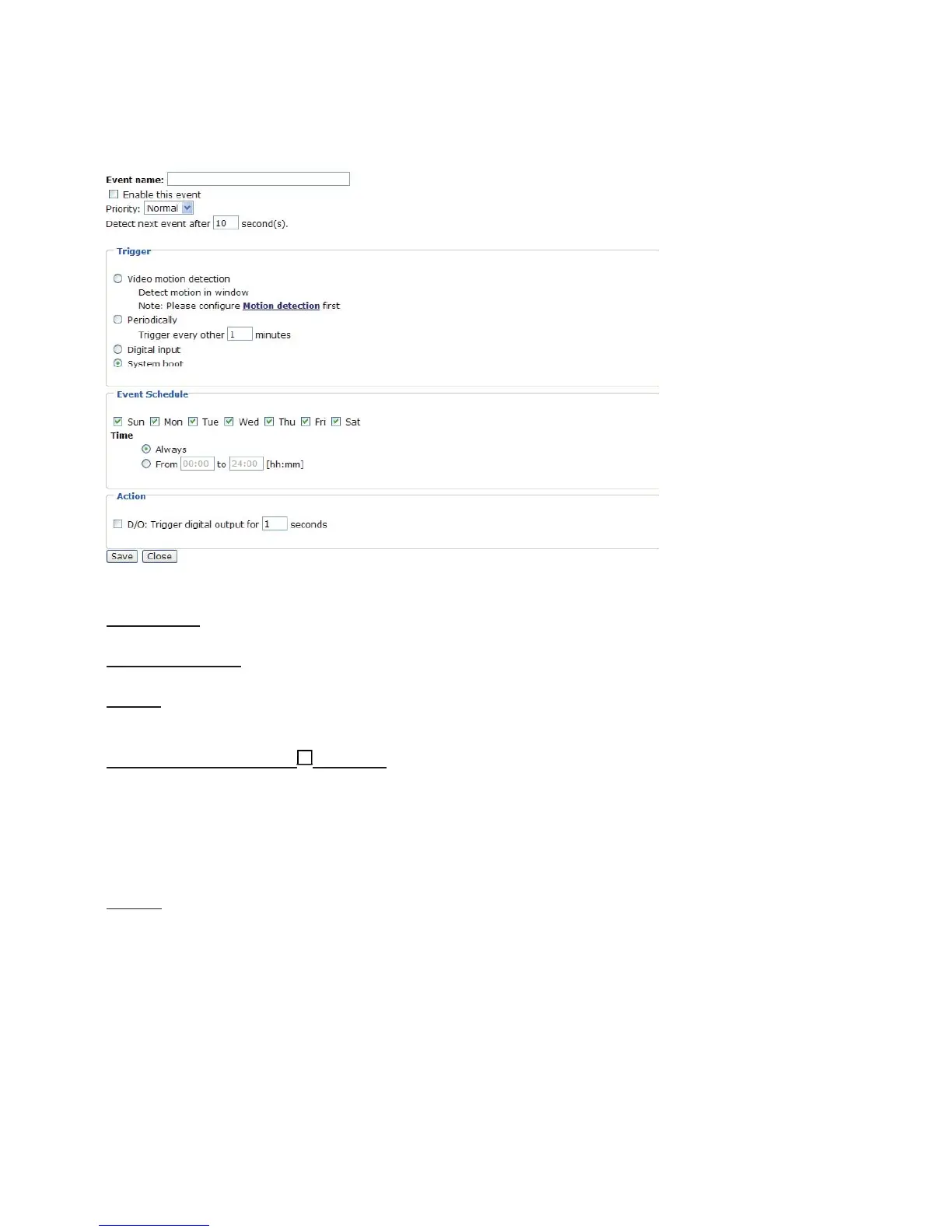
Event Settings
In the Event column, click Add to open the event setting page. In this page, you can arrange
the three elements -- Trigger, Schedule and Action to plot an event. A total of three event
settings can be configured.
Event name: Enter a descriptive name for the event setting.
Enable this event: Select this option to enable this event setting.
Priority: Select the relative importance of this event (High, Normal, and Low). Events with
higher priority setting will be executed first.
Detect next event after seconds: Enter the duration in seconds to pause motion detection
after a motion is detected.
An event is an action initiated by user-defined trigger source; it is the causal arrangement of
the following three elements: Trigger, Event Schedule, and Action.
Trigger: Also referred as the cause or stimulus, defines when to trigger the Network Camera.
The trigger source can be configured to use the Network Camera’s built-in motion detection
mechanism or external digital input devices.There are four choices of trigger sources:
■ Video motion detection
Select this option to allow the Network Camera to use the built-in motion detection
mechanism as a trigger source. To enable this function, you need to configure Motion
detection first. For more information, please refer to Motion detection section for details.
■ Periodically
Select this option to allow the Network Camera to trigger periodically for every other defined
minute. At most 999 minutes can be set.
■ Digital input
Select one of the Digital inputs to allow the Network Camera to use external digital input
device as a trigger source. Depending on your applications, there are choices of digital input















 To Next Page