Introduction
8
Physical Details
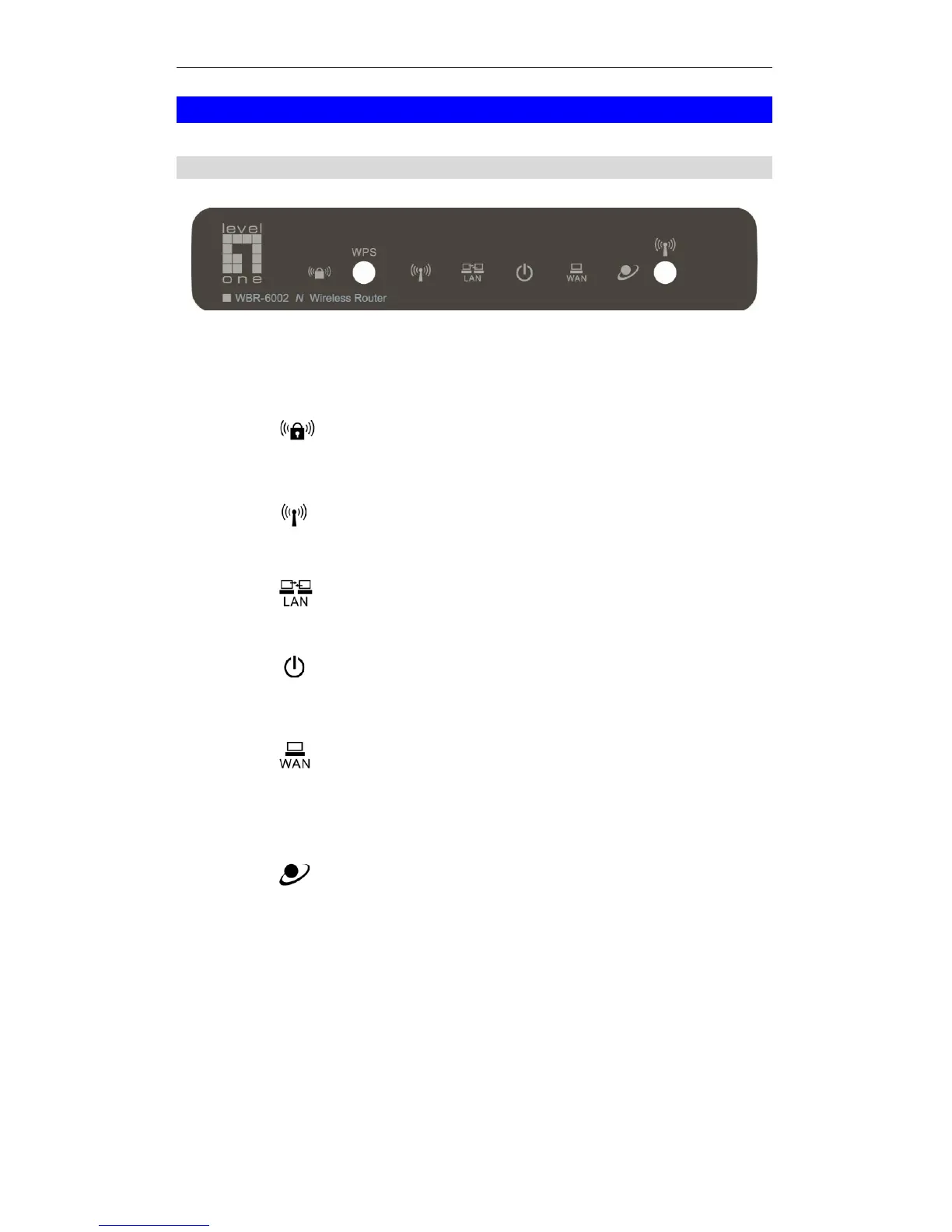
Front Panel
Front Panel
Push the WPS button on the WBR-6002, and also on your
other wireless device to perform WPS syncing to create a
secured wireless connection automatically.
On - Wireless security is On.
Off - Wireless security is Off.
Flashing (Blue) - When WPS sync in progress.
On - Wireless Devices or Computers are connected to the
WBR-6002.
Off - No Wireless connections currently exist.
On - Wired Devices or Computers are connected to the
WBR-6002.
Off - No active wired connections on the LAN port(s).
On - Router is ON and ready.
Flashing (Blue) - Router is booting up
Off - Router is OFF
On - Connection to the ADSL/Broadband Modem attached to
the WAN (Internet) port is established.
Off - No connection to the ADSL/Broadband Modem.
Flashing (Amber) – Router is attempting to connect to the
Internet.
On - Internet connection is available.
Off - No Internet connection available.
Push button for 3 seconds to Enable or Disable the wireless
signal.
Reboot - Press WPS and Wireless On/Off buttons together
for 5 seconds. The router will restart and boot again.
Reset – Press WPS and Wireless On/Off buttons together for
10 seconds.
All settings will be CLEARED and restored to factory defaults.















 To Next Page