Advanced Administration
93
Remote Administration
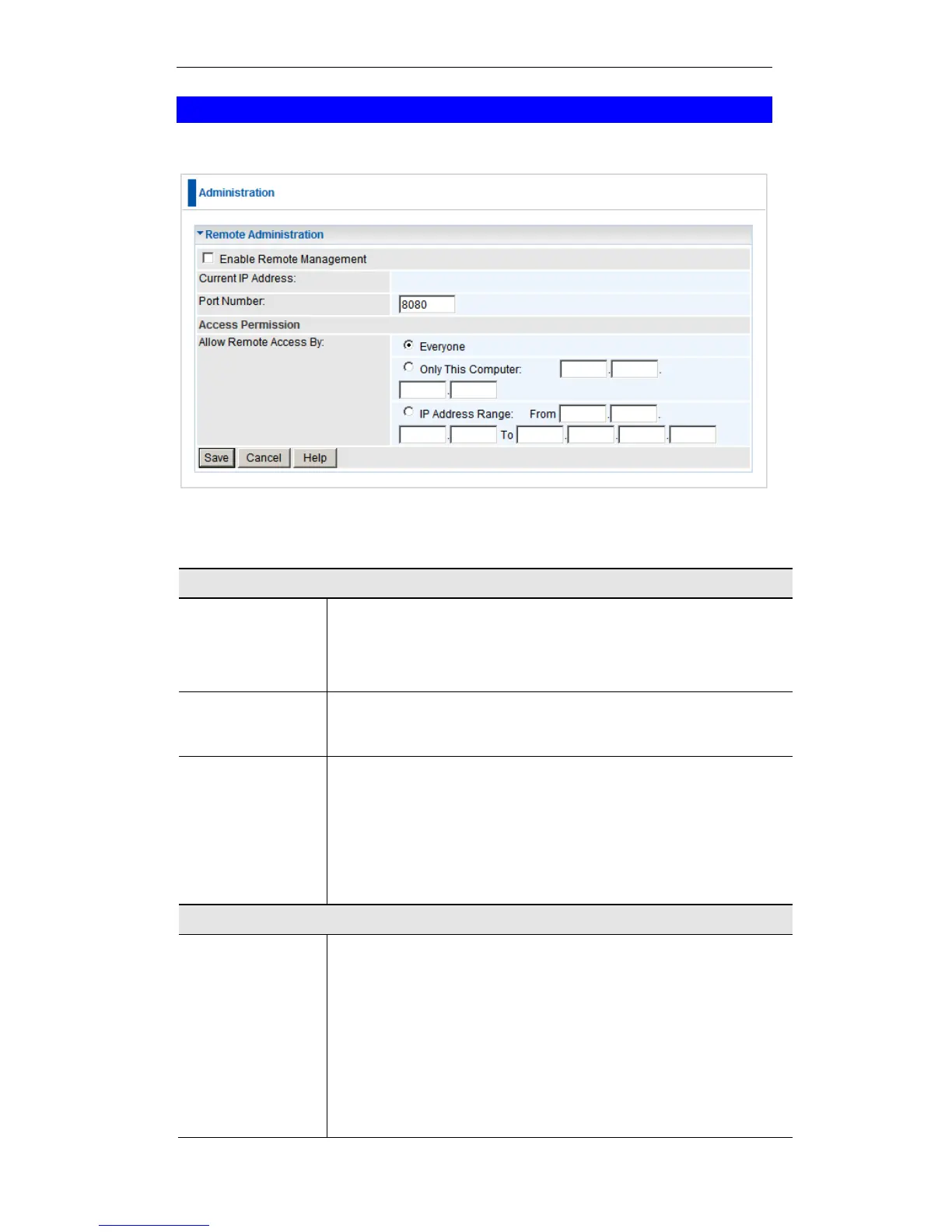
If enabled, this feature allows you to manage the Wireless Router via the Internet.
Remote Administration Screen
Data - Remote Administration Screen
Check to allow administration/management via the Internet. (To
connect, see below).
If Disabled, this device will ignore Administration connection
attempts from the Internet.
This is the current address you will use when accessing this
device from the Internet. To connect, see details and an exam-
ple below.
Enter a port number between 1 and 65535. The default for
HTTP (Web) connections is port 80, but using port 80 will
prevent the use of a Web "Virtual Server" on your LAN. So
using a different port number is recommended. The default
value is 8080.
The port number must be specified in your Browser when you
connect. See the following section for details.
Select the desired option.
Everyone - allow access by everyone on the Internet.
Only This Computer - allow access by only one IP ad-
dress. Enter the desired IP address.
IP Address Range - allow access from a range of IP
addresses on the Internet. Enter a beginning and ending IP
address to define the allowed range.
For security, you should restrict access to as few external IP
addresses as practical.















 To Next Page