4
Installation
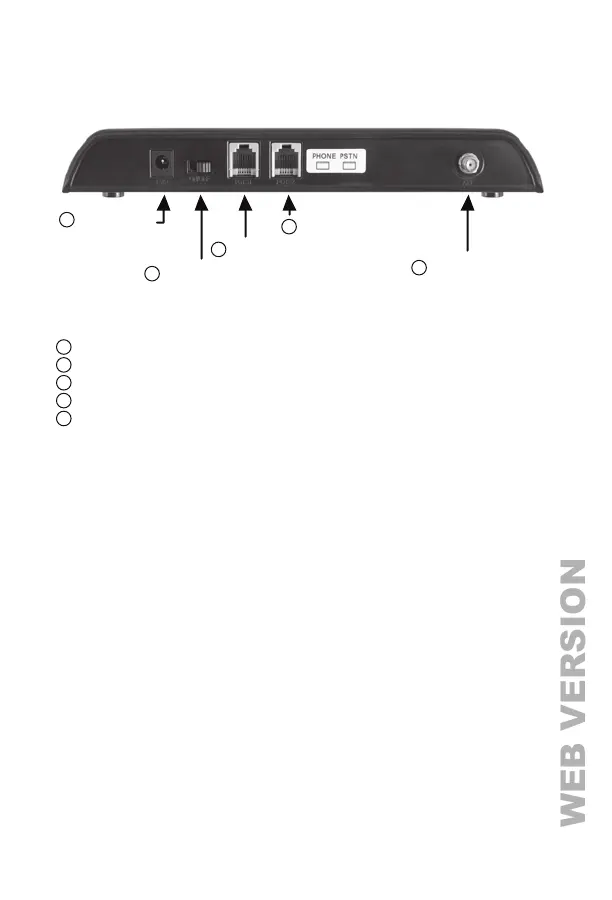
Power Jack: Connects the supplied 12V Power Adapter
Power Switch: Turns the unit On or Off
Phone Jack: Connects to house telephones or alarm panel
PSTN Jack: Connects to PSTN telephone line
Antenna Jack (SMA): Connects the supplied antenna
Install the Antenna
1) Screw the antenna onto the antenna base.
2) Attach the SMA connector of the base to the C3 Antenna Jack.
3) Locate the antenna away from the C3.
4) Completely uncoil the antenna cable to avoid interference.
Warning: Do not mount the antenna outdoors.
Install the Power Adapter
Plug the connector from the supplied 12V Power Adapter into the C3 Power Jack.
Plug the 12V Power Adapter into a 120VAC outlet.
Antenna Jack
Power Switch
Power Jack
Phone Jack
PSTN Jack
2
1
3
4
5



 To Next Page