
 To Next Page
S
Sheryl BarnesAug 7, 2025
What to do if my Levoit Thermostat sensor is offline?
- AAshley EdwardsAug 7, 2025
If your Levoit Thermostat sensor is offline, try resetting it by removing and reinserting the batteries.

What to do if my Levoit Thermostat sensor is offline?
If your Levoit Thermostat sensor is offline, try resetting it by removing and reinserting the batteries.
Why doesn't my Levoit Aura Sensor sensor connect to the thermostat?
Your Levoit Thermostat sensor may not connect to the thermostat for a few reasons: 1. Ensure that both the thermostat and the room sensor are added to the same VeSync account. 2. Make sure the thermostat and sensor are within 164 ft / 50 m of each other. 3. The sensor's batteries may be low. Replace with 2 AAA batteries.
What to do if the VeSync app does not show temperature and humidity information for my Levoit Aura Sensor Thermostat sensor?
If the VeSync app isn't displaying temperature and humidity information from your Levoit Thermostat sensor, restart the pairing process by removing the sensor’s batteries and reinserting them. This will automatically put the sensor in pairing mode.
How to fix a Levoit Aura Sensor sensor that doesn't show temperature and humidity?
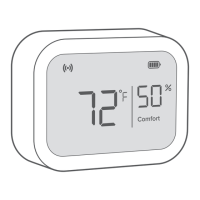
If your Levoit Thermostat sensor isn't showing temperature and humidity, ensure the sensor is on and the batteries are installed with the correct polarity.
How to turn on the Levoit Aura Sensor Thermostat sensor display?
If the display on your Levoit Thermostat sensor doesn't turn on: * Check the battery compartment for a battery tab and remove it. Reinsert the batteries and close the compartment. * The sensor’s batteries may be low. Replace with 2 AAA batteries.
Lists compatible devices with the Levoit Aura™ Sensor, including the Smart Thermostat.
Essential safety guidelines for handling and using the sensor to prevent hazards.
Instructions on proper usage, battery replacement, and maintenance for the sensor.
Guidance on installing the Aura Sensor, either independently or with a smart thermostat.
Steps to mount the sensor securely on a wall using the provided bracket.
Instructions for setting up the sensor on a table or shelf using the desktop stand.
Guide to downloading and configuring the VeSync app for sensor operation.
Procedure for pairing the Aura Sensor with your smartphone via the VeSync app.
Details on key features like remote monitoring and instant alerts provided by the VeSync app.
How to switch between Fahrenheit and Celsius display units within the VeSync app.
Step-by-step instructions for safely replacing the sensor's batteries.
Solutions for common connectivity issues between the sensor and the VeSync app.
Details the product warranty period, coverage, and terms of service for the Aura Sensor.
 General
| Brand | Levoit |
|---|---|
| Model | Aura Sensor |
| Category | Thermostat |
| Language | English |