6
CONTROLS
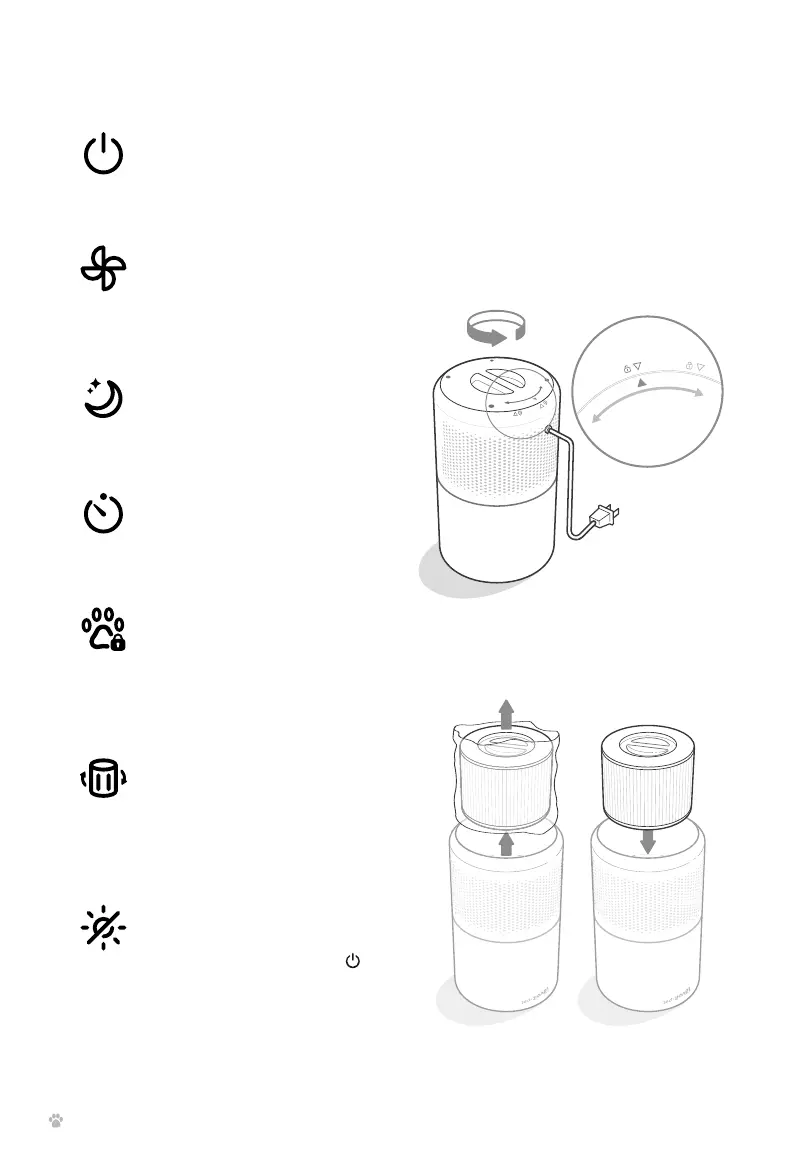
On/O Button
• Turns the air purifier on/o.
Fan Speed Button
• Cycles through fan speeds:
I (low), II (medium), and III
(high).
Sleep Mode Button
• Turns Sleep Mode on/o
(see page 8).
Timer Button
• Cycles through timer
options (see page 8).
Check Filter Indicator
• Lights up when the filter
should be checked (see
Check Filter Indicator
page 10).
Display O Button
• Turns the display o.
• Tap any button (except )
to turn the display back on.
GETTING STARTED
1. Flip the air purifier over. Twist the filter
cover counterclockwise and remove it.
[Figure 1.1]
2. Remove the filter from its plastic
packaging and place the filter back into
the air purifier with the handle facing up.
[Figure 1.2]
Figure 1.1
Figure 1.2
Pet Lock Button
• Prevents current settings
from being changed, such
as by children or pets (see
page 8).



 To Next Page